
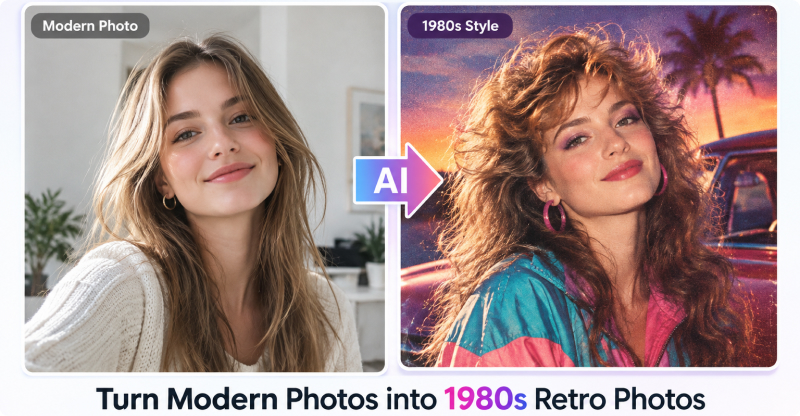
The 1980s are making a comeback in AI-generated images, from bold hairstyles and colorful fashion to vintage settings and film effects. In this guide, we’ll explore key 1980s aesthetics, best AI photo prompts, and how to turn ordinary photos into realistic retro images with ChatGPT.
Part 1. What Is the 1980s AI Photo Trend?
1980s AI photos are a viral image-editing trend that transforms modern selfies and portraits into authentic-looking retro images. Using ChatGPT and other AI tools, you can recreate iconic 1980s hairstyles, fashion, lighting, poses, backgrounds, and film effects while keeping the subject recognizable.
What is the aesthetic style of the 1980s?
The 1980s aesthetic is known for being bold, colorful, energetic, and highly expressive. It combines eye-catching fashion, playful graphic design, emerging technology, and distinctive analog photography.
| 1980s Aesthetic | Key Visual Elements | AI Prompt Keywords |
|---|---|---|
| Bold Colors | Neon pink, electric blue, purple, turquoise, bright yellow | neon colors, vibrant palette, bold contrast |
| Big Hairstyles | Teased hair, perms, voluminous curls, mullets, high ponytails | big hair, voluminous curls, teased hairstyle |
| 80s Fashion | Shoulder pads, acid-wash denim, oversized jackets, leggings, graphic tees | 1980s fashion, shoulder pads, acid-wash jeans |
| Neon & Synthwave | Neon lights, glowing gradients, dark backgrounds, retro grids | neon glow, synthwave, retro grid |
| Memphis Design | Geometric shapes, squiggly lines, dots, abstract patterns | Memphis style, geometric shapes, playful patterns |
| Retro Technology | CRT TVs, VHS tapes, cassette players, arcade machines, landline phones | 1980s technology, CRT television, VHS, arcade |
| Analog Photography | 35mm film grain, faded colors, soft focus, direct flash | 35mm film, subtle grain, faded colors, analog photo |
| Everyday 80s Settings | Shopping malls, arcades, bedrooms, schools, suburban homes | 1980s mall, arcade, school hallway, suburban home |
| Pop Culture Style | Movie posters, music-inspired fashion, colorful graphics | 80s pop culture, retro graphics, vintage poster |
| Retro Cars | Boxy sedans, classic sports cars, vintage station wagons | 1980s car, classic sports car, vintage vehicle |
Part 2. How to Create a 1980s AI Photo with ChatGPT
Join the 1980s AI photo trend by using ChatGPT to transform a modern portrait into an authentic retro image while preserving your facial features. Simply upload a photo and describe your desired 1980s style, or create a completely new retro scene with a text prompt.
How to Turn Modern Photos into Realistic Retro Photos
Step 1. Open ChatGPT. Start a new chat or open the Images experience.
Step 2. Upload a clear photo. Use the attachment button or drag and drop an image into the chat.
Step 3. Enter a 1980s AI photo prompt. Describe the retro style and specify what to change or keep.
Step 4. Generate the image. Let ChatGPT create your retro photo based on the prompt.
Step 5. Refine the result. Add specific instructions to improve the 1980s look and realism.
Step 6. Download the image. Save your finished retro photo to your device.

Tips for Best Results
- Preserve Identity: Use phrases like “Keep my facial features, identity, and expression unchanged” to maintain the original face.
- Use Authentic Film Details: Add details like “35mm film grain,” “direct camera flash,” and “faded paper texture,” while avoiding modern HD sharpness.
- Start with a Solo Photo: Clear single-person photos usually produce more consistent results than group photos.
- Be Specific: Go beyond “retro” or “vintage” by describing the fashion, hairstyle, setting, lighting, camera style, film texture, and specific year.
Part 3. Top 10 1980s AI Photo Prompts for Retro Images
Here are 10 copy-and-paste prompts covering different 1980s aesthetics, from classic family portraits to fashion, street photography, and cinematic scenes.
1980s AI Photo Prompt Formula:Subject + Exact Year + Hairstyle + Clothing + Setting + Lighting + Camera Style + Film Texture + Identity Preservation
Classic 1980s Portrait
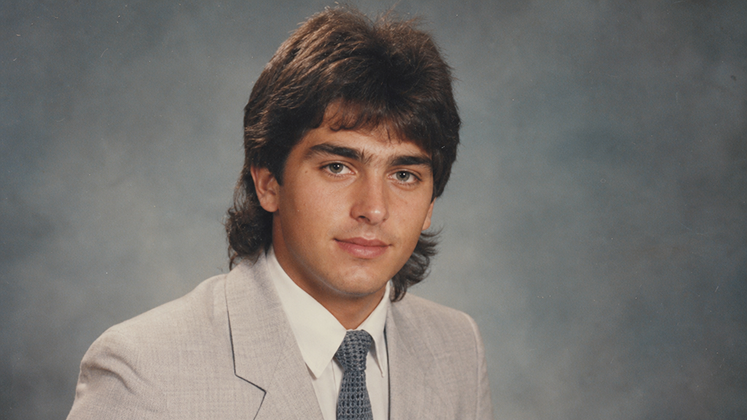
Transform this photo into a realistic portrait taken in the mid-1980s. Preserve the person's recognizable facial features, identity, skin tone, and natural proportions. Add an authentic 1980s hairstyle, period-appropriate clothing, soft studio lighting, subtle 35mm film grain, slightly faded colors, and natural photographic imperfections. Make it look like a genuine photograph from 1985, not a modern image with a vintage filter.
1980s Family Photo
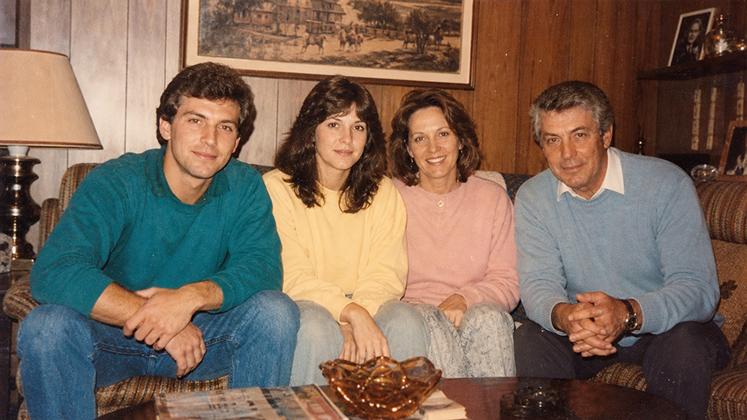
Turn this photo into a warm 1980s family album photograph. Keep everyone's facial identity and natural expressions recognizable. Dress the subjects in authentic 1980s casual clothing and place them in a cozy American living room with period-appropriate furniture and decor. Use direct camera flash, warm colors, soft focus, subtle film grain, and slightly faded 35mm film texture.
1980s High School Yearbook
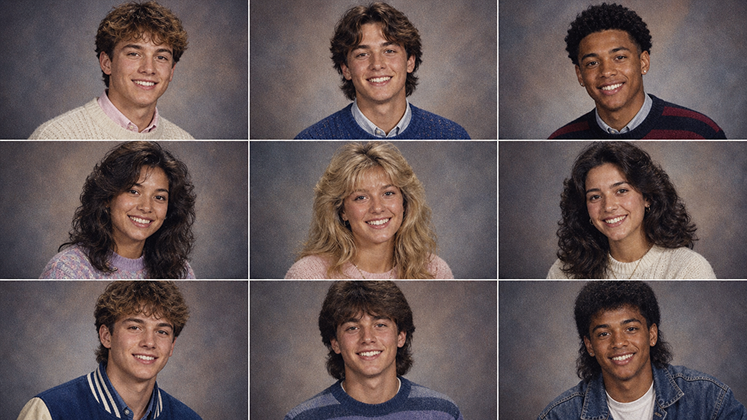
Recreate this image as an authentic 1980s American high school yearbook portrait. Preserve the person's identity and facial features. Give them a classic 1980s hairstyle and period-appropriate sweater or varsity-style clothing. Use a simple studio backdrop, soft portrait lighting, slightly muted colors, gentle film grain, and the look of an actual 1980s yearbook photograph.
1980s Fashion Portrait
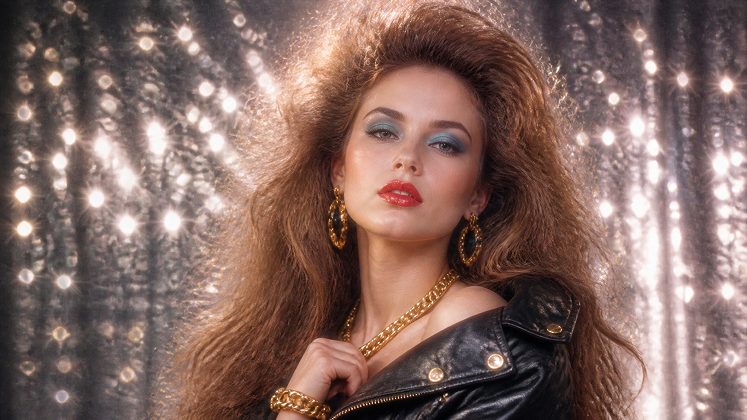
Transform this photo into a glamorous 1980s fashion portrait. Preserve the person's facial identity and proportions while adding voluminous 1980s hair, bold makeup, oversized fashion, statement accessories, and vibrant colors. Use dramatic studio lighting, a professional fashion photography composition, 35mm film grain, soft focus, and authentic analog imperfections.
1980s Street Photography
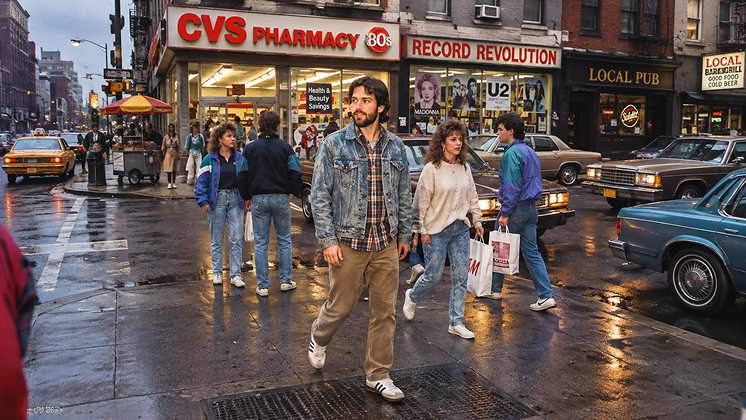
Turn this photo into a candid 1980s street photograph in an American city. Preserve the person's recognizable face and natural appearance. Add authentic 1980s clothing, hairstyles, storefronts, cars, signs, and street details. Use direct flash, natural shadows, slightly faded colors, subtle 35mm grain, and an imperfect candid composition.
1980s Mall Photo
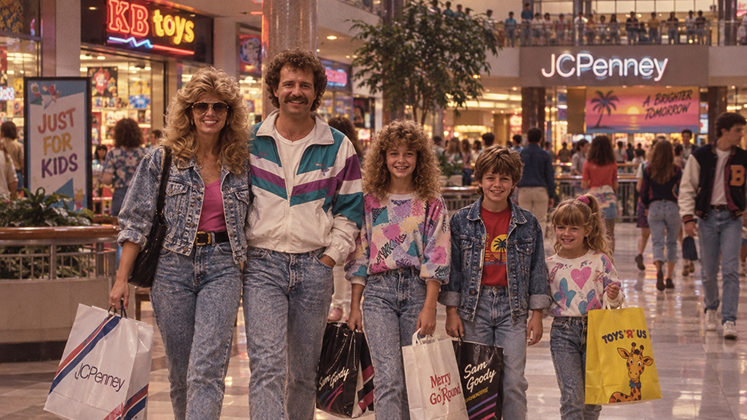
Recreate this image as a realistic photograph taken inside an American shopping mall in 1985. Keep the person's facial identity unchanged. Give them authentic 1980s clothing and hairstyle, with vintage storefronts, colorful advertisements, patterned floors, and period-appropriate details in the background. Use direct flash, soft focus, faded colors, and subtle analog film grain.
1980s Arcade Photo
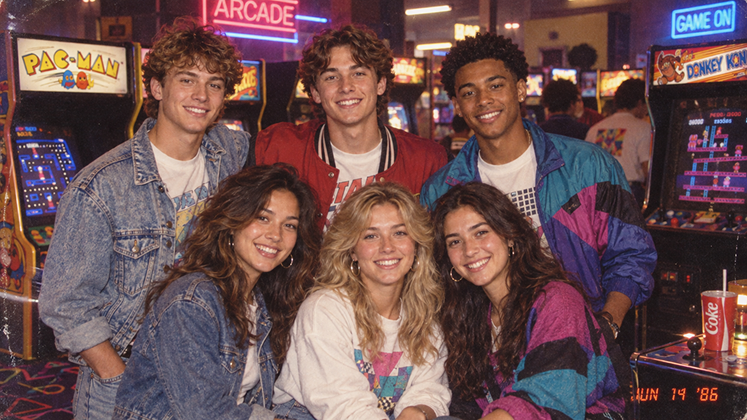
Transform this photo into a fun 1980s arcade snapshot. Preserve the person's identity and facial features. Place them in a classic arcade surrounded by vintage video game machines, neon lights, and colorful 1980s decor. Add period-appropriate clothing and hairstyle, direct camera flash, realistic reflections, subtle 35mm film grain, and the slightly imperfect look of an old printed photograph.
1980s Beach Vacation
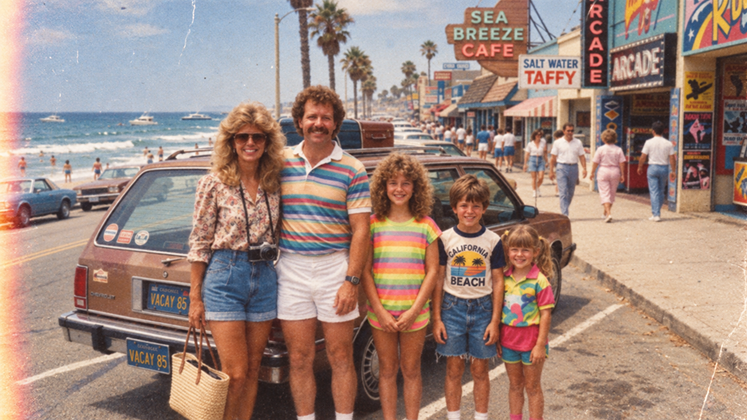
Turn this photo into a nostalgic 1980s beach vacation snapshot. Preserve the person's recognizable face, natural proportions, and expression. Add authentic 1980s swimwear and casual clothing, a vintage beach setting, colorful umbrellas, classic cars, and period-appropriate details. Use bright natural sunlight, direct flash, faded film colors, subtle grain, and realistic 35mm photography.
1980s Couple Photo
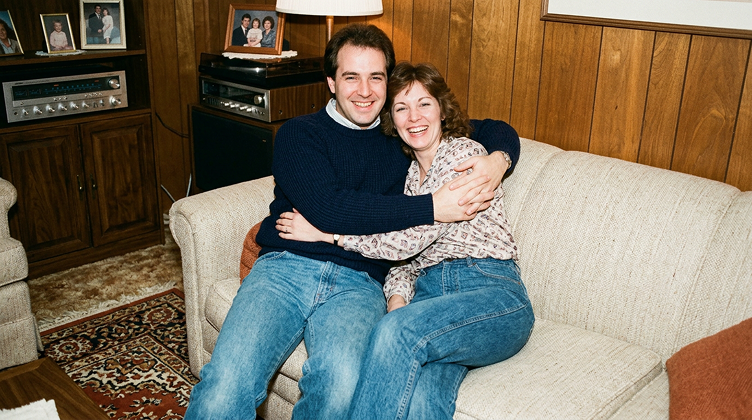
Transform this image into a romantic 1980s couple photograph. Preserve both people's recognizable facial features and natural expressions. Dress them in authentic 1980s fashion and place them in a vintage American setting. Use warm lighting, direct flash, soft focus, slightly faded colors, subtle 35mm film grain, and natural imperfections to create the feeling of a genuine photograph from the decade.
1980s Cinematic Movie Scene
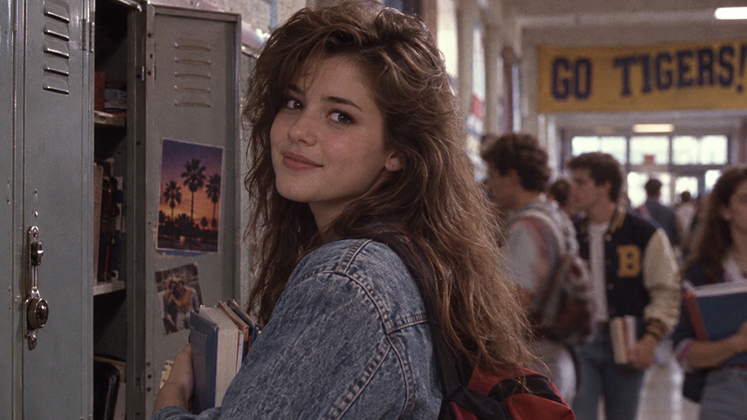
Reimagine this photo as a cinematic still from an American movie made in 1987. Preserve the person's identity and recognizable facial features. Give the subject authentic late-1980s clothing and hairstyle and place them in a detailed period-accurate setting. Use dramatic cinematic lighting, realistic shadows, 35mm film texture, subtle grain, slightly faded colors, soft highlights, and authentic analog photography imperfections. Avoid modern objects, clothing, technology, and visual effects.
1980s AI Photo Prompts for Different Styles
| Style | Suggested Keywords |
|---|---|
| American 80s | mall, denim, varsity jacket, 35mm |
| Hollywood | studio portrait, glamorous lighting, cinematic |
| Retro Family | family album, warm flash, faded print |
| Fashion | bold colors, oversized clothing, editorial |
| Street | urban street, candid snapshot, analog film |
| Disco | dance floor, colorful lights, glamorous |
| VHS | VHS still, soft resolution, analog texture |
| Polaroid | instant photo, white border, faded colors |
| Yearbook | school portrait, studio backdrop |
| Vacation | beach, road trip, vintage travel photo |
Part 4. How to Make an AI Retro Photo With Vidverse (Step-by-Step)
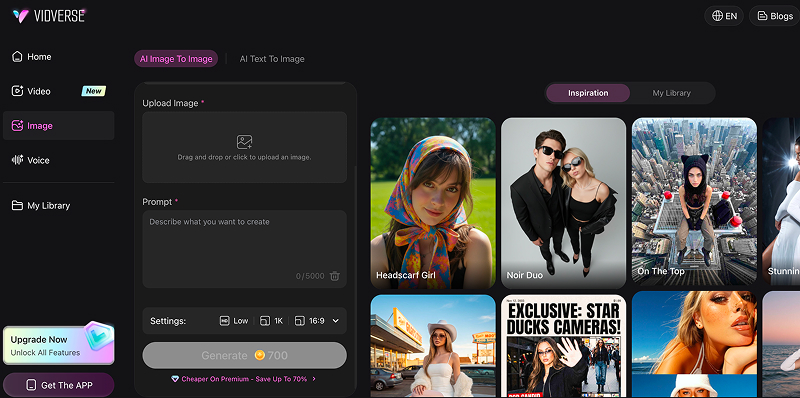
Vidverse AI offers a focused AI image-creation workflow for quickly transforming photos into vintage and 1980s-style images with dedicated generation and editing tools. Use AI Image to Image to restyle an existing photo with prompts and references, or AI Text to Image to create a new 1980s-inspired scene from scratch.
- Step 1.Go to Vidverse AI and sign in. Vidverse supports AI image generation and image-to-image editing directly online.
- Step 2.Choose AI Image to Image if you want to transform an existing photo into a 1980s-style image. If you don’t have a photo, choose AI Text to Image to create a new retro image from scratch.
- Step 3.Upload your photo. For the best results, use a clear portrait or selfie with the face, hairstyle, and clothing clearly visible.
- Step 4.Enter a 1980s-style image prompt. Describe your desired year, fashion, hairstyle, setting, lighting, and photography style.
- Step 5.Click Generate to create your retro photo. Review the result and make targeted adjustments or regenerate it if needed.
Vidverse AI vs. ChatGPT: What’s the Difference?
Vidverse AI and ChatGPT both support image creation and editing, making them useful for creating 1980s-style portraits, retro photos, and other vintage-inspired images. The key difference is the workflow: Vidverse AI focuses on AI photo and video creation, while ChatGPT is a general-purpose AI assistant for tasks like writing, image generation, and coding.
Key Differences at a Glance
| Feature | Vidverse AI | ChatGPT |
|---|---|---|
| Primary Output | Videos, motion animations, transformed photos | Text, code, logical reasoning, document analysis |
| Core Specialty | Animate images, Motion Mimic, template-based video effects | Natural conversations, writing, strategy, problem-solving |
| Input Format | Upload photos/reference videos or choose templates | Text prompts, images, files, spoken voice |
| Video Features | First/last frame control, video extension, multi-image reference | No native video editing or rendering |
| Creative tools | Focused on AI image/video/audio creation | Images plus writing, research, analysis, and other AI tasks |
| Best for | Users focused on AI content creation | Users who want image generation alongside broader AI capabilities |
Which One Should You Choose?
- Choose Vidverse AI if: You are a content creator looking to generate viral short-form videos, animate static photos, apply video motion effects, or make character animations for platforms like TikTok, Instagram Reels, or Shorts.
- Choose ChatGPT if: You need to draft video scripts, write articles, code applications, analyze information, or brainstorm creative ideas.
Part 5. How to Fix Common 1980s AI Photo Problems
Even with a detailed prompt, an AI-generated 1980s photo may look too modern, overly stylized, or fail to preserve the original person's appearance. The most common issues are usually related to identity, period accuracy, film texture, colors, and background details.
Problem 1: It Looks Like a Modern Photo
If the result still looks like a modern photo, you can restore the retro feel by targeting the elements that make a photograph look authentically 1980s:
- Add analog film texture: Ask for subtle 35mm film grain, slight softness, and natural photographic imperfections to reduce the overly clean digital appearance.
- Adjust the color palette: Use slightly faded, muted colors with warm or gently shifted tones instead of modern high-contrast, highly saturated colors.
- Change the lighting: Add direct on-camera flash, soft studio lighting, or slightly uneven exposure typical of consumer film photography.
- Update the fashion: Replace contemporary clothing with period-specific pieces such as oversized blazers, denim jackets, high-waisted jeans, or vintage sportswear.
- Change the hairstyle: Specify authentic 1980s hairstyles, such as voluminous curls, feathered layers, or side-swept bangs.
Problem 2: The Face Changes Too Much
- Preserve Facial Identity:Tell the AI to **keep the original facial features, skin tone, age, and proportions unchanged** while applying the 1980s style.
- Use a Clear Reference Photo:Use a sharp, well-lit photo with the face clearly visible. Avoid blurry, filtered, or low-resolution images.
- Restore the Face with Targeted Editing:If the face changes, ask the AI to **restore the original identity while keeping the 1980s style, clothing, background, and film effects unchanged.
Problem 3: The Image Looks Too Much Like a Filter
- Add Realistic Film Details:Use 35mm film grain, subtle color fading, soft focus, and natural imperfections instead of a generic vintage filter.
- Use Period-Specific Details:Include authentic 1980s clothing, hairstyles, furniture, cars, interiors, and cameras to make the scene feel more realistic.
- Keep Effects Subtle:Use light film grain, blur, scratches, and color shifts to avoid an overly filtered or artificial look.
Problem 4: The Clothes Don't Look Authentic
Clothes often look inauthentic because AI default settings tend to generate modern "retro costume party" outfits or contemporary cuts with an 80s filter, rather than true period-accurate garments.
- Specify Period-Accurate Clothing:Instead of simply asking for “1980s clothes,” mention recognizable details such as shoulder-padded blazers, acid-wash denim, high-waisted jeans, oversized jackets, colorful knitwear, leggings, or period-appropriate sportswear.
- Include the Exact Year and Setting:Specify a year such as 1983, 1985, or 1988, along with the context—for example, an American high school, shopping mall, office, or casual family gathering.
- Correct the Outfit with Targeted Edits:If the clothing still looks modern, ask the AI to keep the face and composition unchanged while replacing only the outfit with a specific 1980s look. For example: “Replace the modern outfit with a 1985 oversized denim jacket, high-waisted acid-wash jeans, and period-appropriate sneakers.”
Problem 5: Too Much Grain or Blur
This usually happens when the prompt overemphasizes “vintage,” “film grain,” or “old photo” effects, causing the AI to exaggerate grain and softness instead of recreating a naturally aged photograph. Authentic 1980s-style images generally work better with restrained film texture and subtle softness.
- Reduce Film Grain:Use “subtle, natural 35mm film grain” to keep the retro look without making the image too noisy.
- Reduce Excessive Blur: Ask for“slight soft focus while keeping facial features and key details sharp.” This creates a vintage look without excessive blur.
- Restore Image Detail: If the image is too grainy or blurry, ask the AI to reduce grain and blur while preserving the 1980s colors, lighting, and composition.
Problem 6: The Background Looks Modern
This usually happens because the prompt focuses too much on the person and not enough on the 1980s setting. Specify period-accurate furniture, cars, technology, signage, and architecture to keep modern elements out of the background.
- Specify a Period-Accurate Setting:Describe a specific 1980s location, such as an **American living room, mall, arcade, or school hallway**. Specific settings help AI create a more authentic period look.
- Remove Modern Objects:Tell AI to **remove smartphones, flat-screen TVs, modern cars, LED lights, and contemporary furniture**. This prevents modern details from appearing in the scene.
- Replace the Background Only:If the background still looks modern, ask AI to keep the person, face, clothing, and composition unchanged while replacing only the background with a realistic 1980s setting. This gives you more control over the final result.
Part 6. 1980s AI Photo Prompt FAQ
Can You Create 1980s AI Photos Without Uploading a Photo?
Yes. You don’t need to upload an existing photo to create a 1980s-style AI image. Instead, you can use a text prompt to describe the person, setting, clothing, hairstyle, lighting, and photography style, and the AI can generate a completely new retro image.
How do I make an AI photo look like it was taken in 1985?
The key is to describe the specific visual characteristics of a 1985 photograph rather than simply asking for a “vintage” or “retro” look.
- Specify the exact year — Use “1985” instead of just “1980s” to give the AI a more precise visual reference.
- Use period-accurate styling — Describe 1985 clothing, hairstyles, accessories, furniture, cars, and other environmental details.
- Add analog photography details — Ask for 35mm film, direct flash, subtle film grain, slightly faded colors, soft focus, and natural exposure variations.
- Remove modern elements — Tell the AI to exclude smartphones, flat-screen TVs, modern cars, contemporary furniture, LED lighting, and other anachronistic objects.
- Preserve natural imperfections — Request realistic skin texture, slight color shifts, imperfect exposure, and subtle film characteristics rather than heavy filters.
What should I include in an 80s AI photo prompt?
A strong 80s AI photo prompt should describe more than just a “vintage” look. For a realistic result, include these key elements:
- Exact Year or Period:Specify a year such as 1982, 1985, or 1988 instead of simply saying “1980s.” This gives the AI a more precise visual reference.
- Facial Identity:Tell the AI to preserve the person’s recognizable facial features, face shape, skin tone, age, and natural proportions if you're transforming an existing photo.
- Hairstyle & Clothing:Describe specific period-appropriate details, such as voluminous hair, feathered hairstyles, oversized blazers, denim jackets, high-waisted jeans, or vintage sportswear.
- Background & Setting:Specify where the photo was taken, such as an 1985 American living room, shopping mall, arcade, school hallway, studio, or city street. A concrete setting helps avoid a generic modern background.
- Lighting:Include photography-specific lighting such as direct on-camera flash, soft studio lighting, warm indoor light, or natural window light.
- Camera & Film Style:Use terms like 35mm analog film, subtle film grain, soft focus, slightly faded colors, natural exposure variation, and vintage print texture to recreate the characteristics of period photography.
- Composition & Pose:Describe whether you want a close-up portrait, waist-up shot, full-body photo, candid snapshot, or family group portrait, along with the desired pose.
- Modern Elements to Avoid:Explicitly exclude smartphones, flat-screen TVs, modern cars, LED lighting, contemporary clothing, and other post-1980s objects if they would conflict with the scene.
What Makes an 1980s AI Photo Look Authentic?
A convincing result usually combines several elements:
- Retro hairstyles: voluminous hair, curls, feathered styles, or side-swept bangs
- Period clothing: denim jackets, oversized blazers, colorful sweaters, and vintage sportswear
- 1980s settings: malls, arcades, family homes, studios, schools, or city streets
- Vintage lighting: direct flash, warm studio lighting, or soft exposure
- Analog photography: 35mm film, subtle grain, faded colors, soft focus, and natural imperfections
- Identity preservation: keeping the person's recognizable facial features and natural proportions
Can I Create 1980s AI Photos For Free?
Yes. Vidverse AI can be used to create 1980s-style AI photos for free, including transforming an existing photo with AI Image to Image or creating a new retro image from a text prompt. New users receive free credits after signing in, so you can try the image-generation features without paying upfront.
Final Thoughts
Creating a convincing 1980s AI photo is all about using the right combination of period-specific details, including fashion, hairstyles, settings, lighting, and film effects. With well-crafted prompts and tools like ChatGPT or Vidverse AI,you can easily transform modern photos into realistic retro images and experiment with different 1980s-inspired styles. Start with the era’s defining elements, then fine-tune your prompt to create a look that feels authentic and uniquely yours.
'%3e%3crect%20y='2.1906'%20width='26'%20height='17.4314'%20rx='1.55981'%20fill='white'/%3e%3c/g%3e%3crect%20x='0.311961'%20y='2.50256'%20width='25.3761'%20height='16.8075'%20rx='1.24784'%20stroke='%2322257C'%20stroke-width='0.623922'/%3e%3c/g%3e%3crect%20x='13.078'%20y='15.5656'%20width='10.8016'%20height='2.49569'%20rx='0.623922'%20fill='%2366B3FF'%20stroke='%2322257C'%20stroke-width='0.623922'/%3e%3crect%20x='-0.311961'%20y='0.311961'%20width='10.8016'%20height='2.49569'%20rx='0.623922'%20transform='matrix(-1%200%200%201%2012.61%2015.2536)'%20fill='%2366B3FF'%20stroke='%2322257C'%20stroke-width='0.623922'/%3e%3crect%20x='10.3093'%20y='13.3231'%20width='4.91339'%20height='6.98013'%20rx='2.45669'%20fill='%2322257C'/%3e%3cpath%20d='M18.9174%200.31543C20.5962%200.268025%2022.1261%200.655527%2023.9487%201.55762C24.0483%201.60695%2024.1137%201.71153%2024.1137%201.8291V16.502C24.1137%2016.7236%2023.8763%2016.891%2023.6499%2016.7979C21.803%2016.0377%2020.2158%2015.6963%2018.4975%2015.7705C16.8915%2015.8399%2015.1907%2016.2732%2013.0776%2017.0332V1.6709C15.4678%200.825877%2017.2746%200.36187%2018.9174%200.31543Z'%20fill='white'%20stroke='%2322257C'%20stroke-width='0.623922'/%3e%3cpath%20d='M15.3008%204.57C16.3536%203.94578%2019.2783%203.20503%2021.8909%203.94608'%20stroke='%2366B3FF'%20stroke-width='0.935883'%20stroke-linecap='round'/%3e%3cpath%20d='M15.3008%207.26054C16.3536%206.63631%2019.2783%205.89557%2021.8909%206.63661'%20stroke='%2366B3FF'%20stroke-width='0.935883'%20stroke-linecap='round'/%3e%3cpath%20d='M15.3008%209.95107C16.3536%209.32684%2019.2783%208.5861%2021.8909%209.32714'%20stroke='%2366B3FF'%20stroke-width='0.935883'%20stroke-linecap='round'/%3e%3cpath%20d='M15.3008%2012.6398C16.3536%2012.0156%2019.2783%2011.2749%2021.8909%2012.0159'%20stroke='%2366B3FF'%20stroke-width='0.935883'%20stroke-linecap='round'/%3e%3cpath%20d='M7.08257%200.31543C5.40384%200.268025%203.87393%200.655527%202.05132%201.55762C1.95165%201.60695%201.88628%201.71153%201.88628%201.8291V16.502C1.88628%2016.7236%202.12373%2016.891%202.35014%2016.7979C4.19702%2016.0377%205.78418%2015.6963%207.50249%2015.7705C9.10852%2015.8399%2010.8093%2016.2732%2012.9224%2017.0332V1.6709C10.5322%200.825877%208.72541%200.36187%207.08257%200.31543Z'%20fill='white'%20stroke='%2322257C'%20stroke-width='0.623922'/%3e%3cpath%20d='M10.6992%204.57C9.64638%203.94578%206.72175%203.20503%204.10907%203.94608'%20stroke='%2366B3FF'%20stroke-width='0.935883'%20stroke-linecap='round'/%3e%3cpath%20d='M10.6992%207.26054C9.64638%206.63631%206.72175%205.89557%204.10907%206.63661'%20stroke='%2366B3FF'%20stroke-width='0.935883'%20stroke-linecap='round'/%3e%3cpath%20d='M10.6992%209.95107C9.64638%209.32684%206.72175%208.5861%204.10907%209.32714'%20stroke='%2366B3FF'%20stroke-width='0.935883'%20stroke-linecap='round'/%3e%3cpath%20d='M10.6992%2012.6398C9.64638%2012.0156%206.72175%2011.2749%204.10907%2012.0159'%20stroke='%2366B3FF'%20stroke-width='0.935883'%20stroke-linecap='round'/%3e%3c/g%3e%3cdefs%3e%3cfilter%20x='0'%20y='2.1906'%20width='26'%20height='17.4314'%20filterUnits='userSpaceOnUse'%20color-interpolation-filters='sRGB'%3e%3cfeFlood%20flood-opacity='0'%20result='BackgroundImageFix'/%3e%3cfeBlend%20mode='normal'%20in='SourceGraphic'%20in2='BackgroundImageFix'%20result='shape'/%3e%3cfeColorMatrix%20in='SourceAlpha'%20type='matrix'%20values='0%200%200%200%200%200%200%200%200%200%200%200%200%200%200%200%200%200%20127%200'%20result='hardAlpha'/%3e%3cfeOffset%20dy='-1.24784'/%3e%3cfeComposite%20in2='hardAlpha'%20operator='arithmetic'%20k2='-1'%20k3='1'/%3e%3cfeColorMatrix%20type='matrix'%20values='0%200%200%200%200.572549%200%200%200%200%200.768627%200%200%200%200%200.976471%200%200%200%201%200'/%3e%3cfeBlend%20mode='normal'%20in2='shape'%20result='effect1_innerShadow_0_4'/%3e%3c/filter%3e%3c/defs%3e%3c/svg%3e)