

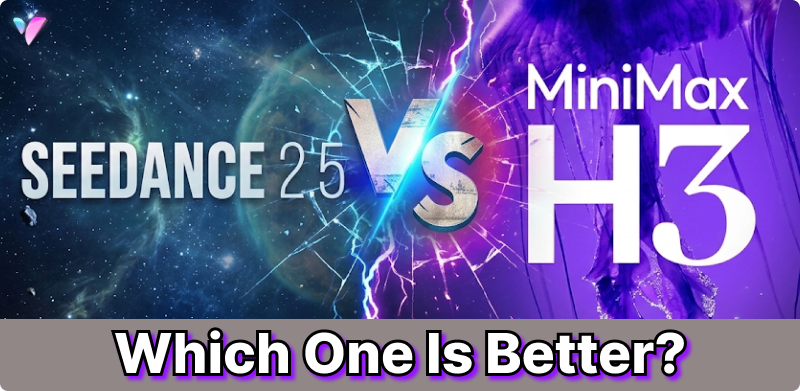
In July 2026, MiniMax launched H3, an open multimodal system that treats video, audio, and images as a unified medium, while ByteDance introduced Seedance 2.5, a closed, API-first model built for long-form storytelling with powerful editing capabilities. So, which one should you choose: Seedance 2.5 or MiniMax H3?
Part 1. Seedance 2.5 vs MiniMax H3: Release Date and Availability
| AI Video Model | Release Date | Release Status |
|---|---|---|
| Seedance 2.5 | July 31, 2026 | Released / rollout in 2026 |
| MiniMax H3 | July 31, 2026 | Officially released |
Part 2. Seedance 2.5 vs MiniMax H3: What Are the New Features?
In this section, we’ll break down the key upgrades in Seedance 2.5 and MiniMax H3 and compare their main differences.
2.1. Seedance 2.5 vs MiniMax H3: Quick Comparison
| Metric / Feature | Seedance 2.5 | MiniMax H3 |
|---|---|---|
| Max Native Duration | Up to 30 seconds (single-pass) | Up to 15 seconds (extendable) |
| Video Generation | Text-to-video, image-to-video, multimodal generation | Text-to-video, image-to-video, video-to-video, multimodal generation |
| Maximum Resolution | 4K | 2K (2560 × 1440) |
| Frame Rate | Adaptive / Variable | Native 24 FPS (cinematic standard) |
| Audio Capabilities | Joint single-pass AV sync | 32 kHz native stereo audio |
| Max Multimodal Inputs | Up to 50 assets (30 img / 10 vid / 10 audio) | Up to 12 assets (9 img / 3 vid / 3 audio) |
2.2. Deep Dive: Where Seedance 2.5 Excels
- 30-Second Single-Pass Storytelling: Create complete multi-shot narratives with consistent characters and lighting across longer sequences—without stitching or extending clips.
- Unmatched Multimodal Reference Capacity (50 Inputs): Manage multi-character scenes with individual actor profiles while preserving backgrounds, spatial layouts, and directional audio cues.
- Surgical Region-Level Editing & Timestamping: Edit specific elements without re-rendering the entire scene, with time-coded shot direction for precise storyboarding.
2.3. Deep Dive: Where MiniMax H3 Excels
- Crisp Native 2K Output & 24 FPS Cinematic Motion: Render natively in film-grade 24 FPS with consistent motion, ready to drop directly into Premiere or DaVinci without external upscaling.
- Audio Fidelity & Stereo Synchronization: 32 kHz native stereo generation for dialogue, Foley, and room ambiance synchronized to on-screen actions.
- Open-Weights & Developer Integration: Self-host H3-Base checkpoints or build custom pipelines with ComfyUI and serverless fal.ai API integration.
Part 3. Seedance 2.5 vs MiniMax H3: Which One Should You Choose?
Choose Seedance 2.5 if quality and production control come first. Choose MiniMax H3 if flexibility, native audio, motion transfer, and cost efficiency matter more.
Seedance 2.5 vs MiniMax H3: Which Is Better for You?
| Your priority | Better choice | Why |
|---|---|---|
| Overall video quality | Seedance 2.5 | Stronger high-end production positioning |
| 4K video | Seedance 2.5 | Supports up to 4K |
| Longer videos | Seedance 2.5 | Up to 30 seconds natively |
| Complex references | Seedance 2.5 | Up to 50 multimodal references |
| Video editing | Seedance 2.5 | Region-level/localized editing |
| Native audio | MiniMax H3 | Integrated audio generation |
| Motion transfer | MiniMax H3 | Strong V2V motion-transfer workflow |
| Short social videos | MiniMax H3 | 2K output is often sufficient |
| Cost efficiency | MiniMax H3 | Strong price-performance positioning |
| Open/custom deployment | MiniMax H3 | Open-weight availability |
The two models are innovating in different directions:
- Seedance 2.5: Best new features for longer videos, 4K output, reference control, and localized editing.
- MiniMax H3: Best new features for native audio, multimodal workflows, motion transfer, and open/customizable deployment.
Part 4. Where Can I Use Seedance 2.5 or MiniMax H3?
If you want to try different AI video models without switching platforms, Vidverse AI offers a convenient all-in-one workflow. It now supports Seedance 2.5 and MiniMax H3, making it easy to explore different generation styles and compare results.
No technical knowledge or API is required to get started. Simply choose a model, upload your assets, enter a prompt, and generate your video online.
How to Use Seedance 2.5 or MiniMax H3 in Vidverse AI?
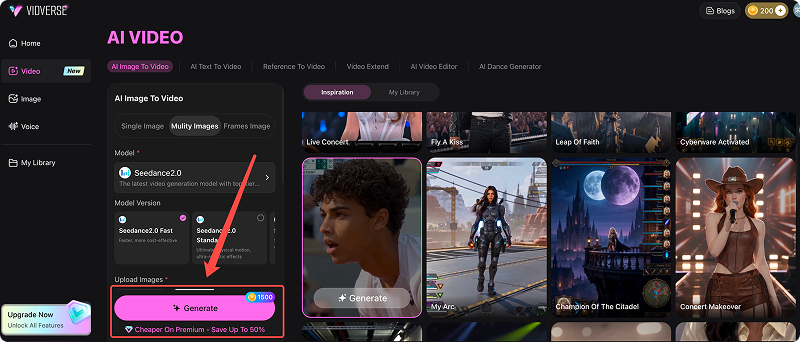
Step 1: Go to Vidverse AI’s Video Tools and select Image to Video or Video Reference.
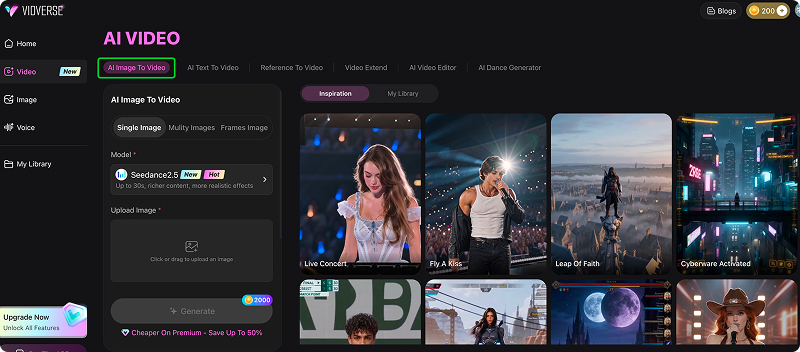
Step 2: Choose Seedance 2.5 or MiniMax H3, depending on your needs.
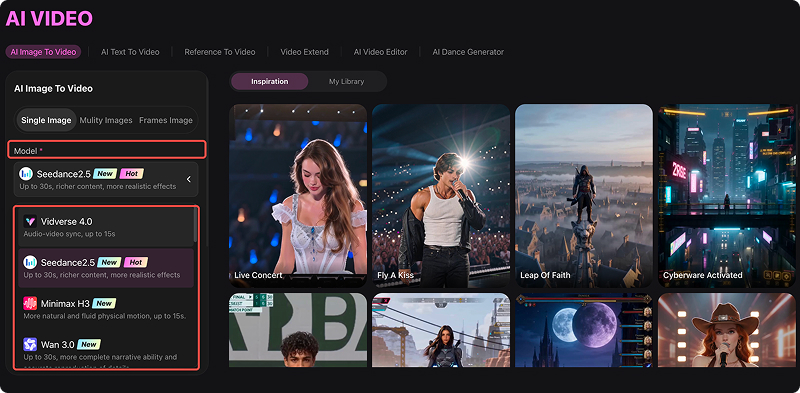
Step 3: Upload an image or select a reference video from the asset library, then click Generate.
FAQs about Seedance 2.5 or MiniMax H3
Is Seedance 2.5 available on Vidverse?
Yes, Seedance 2.5 is now available on Vidverse AI. Log in to Vidverse, select Seedance 2.5 from the video model menu, and you’ll see the features available for your account.
What are the new features of Seedance 2.5?
| Feature | Seedance 2.0 | Seedance 2.5 |
|---|---|---|
| Continuous video | Shorter generation | Up to 30 seconds |
| Reference control | Up to 12 clips | Richer multimodal references |
| Video editing | Basic/advanced multimodal editing | More precise editing workflows |
| Motion control | Supported | More controllable |
| Scene consistency | Strong | Improved for longer sequences |
Compared with Seedance 2.0, Seedance 2.5 focuses on longer videos, higher resolution, stronger reference control, and more precise editing. The five key upgrades are:
- 30-Second Continuous Video Generation
- Native 4K Video Output
- Up to 50 Multimodal References
- More Precise Video Editing and Control
- Improved Prompt Following and Scene Consistency
What is the starting price for the Seedance 2.5 API?
Seedance 2.5 API pricing varies by provider, resolution, and video duration. Third-party access currently starts at around $0.90 per generation, while official BytePlus pricing is usage-based and calculated according to the generation parameters.
How Long Can Seedance 2.5 Generate Videos?
Seedance 2.5 can generate up to 30 seconds of continuous video in a single generation. For longer projects, its extended-duration mode can create videos of up to 180 seconds (3 minutes).
How long can MiniMax H3 generate videos?
MiniMax H3 can generate videos of up to 15 seconds per generation, with supported durations ranging from 4 to 15 seconds in the API.
How much does the MiniMax H3 API cost?
Current API pricing is reported at around $0.13 per second for 2K video, equivalent to about $7.80 per minute. Pricing can vary by API tier and provider, so verify the latest official rate before publishing.
Conclusion
Which is better, Seedance 2.5 or MiniMax H3, depends on your use case. Seedance 2.5 is ideal for filmmakers who prioritize storytelling and precise editing, while MiniMax H3 is better suited to creators and developers seeking high fidelity, smooth frame rates, and flexible integration.
You can try both Seedance 2.5 and MiniMax H3 directly in Vidverse AI's video-generation workflow.

'%3e%3crect%20y='2.1906'%20width='26'%20height='17.4314'%20rx='1.55981'%20fill='white'/%3e%3c/g%3e%3crect%20x='0.311961'%20y='2.50256'%20width='25.3761'%20height='16.8075'%20rx='1.24784'%20stroke='%2322257C'%20stroke-width='0.623922'/%3e%3c/g%3e%3crect%20x='13.078'%20y='15.5656'%20width='10.8016'%20height='2.49569'%20rx='0.623922'%20fill='%2366B3FF'%20stroke='%2322257C'%20stroke-width='0.623922'/%3e%3crect%20x='-0.311961'%20y='0.311961'%20width='10.8016'%20height='2.49569'%20rx='0.623922'%20transform='matrix(-1%200%200%201%2012.61%2015.2536)'%20fill='%2366B3FF'%20stroke='%2322257C'%20stroke-width='0.623922'/%3e%3crect%20x='10.3093'%20y='13.3231'%20width='4.91339'%20height='6.98013'%20rx='2.45669'%20fill='%2322257C'/%3e%3cpath%20d='M18.9174%200.31543C20.5962%200.268025%2022.1261%200.655527%2023.9487%201.55762C24.0483%201.60695%2024.1137%201.71153%2024.1137%201.8291V16.502C24.1137%2016.7236%2023.8763%2016.891%2023.6499%2016.7979C21.803%2016.0377%2020.2158%2015.6963%2018.4975%2015.7705C16.8915%2015.8399%2015.1907%2016.2732%2013.0776%2017.0332V1.6709C15.4678%200.825877%2017.2746%200.36187%2018.9174%200.31543Z'%20fill='white'%20stroke='%2322257C'%20stroke-width='0.623922'/%3e%3cpath%20d='M15.3008%204.57C16.3536%203.94578%2019.2783%203.20503%2021.8909%203.94608'%20stroke='%2366B3FF'%20stroke-width='0.935883'%20stroke-linecap='round'/%3e%3cpath%20d='M15.3008%207.26054C16.3536%206.63631%2019.2783%205.89557%2021.8909%206.63661'%20stroke='%2366B3FF'%20stroke-width='0.935883'%20stroke-linecap='round'/%3e%3cpath%20d='M15.3008%209.95107C16.3536%209.32684%2019.2783%208.5861%2021.8909%209.32714'%20stroke='%2366B3FF'%20stroke-width='0.935883'%20stroke-linecap='round'/%3e%3cpath%20d='M15.3008%2012.6398C16.3536%2012.0156%2019.2783%2011.2749%2021.8909%2012.0159'%20stroke='%2366B3FF'%20stroke-width='0.935883'%20stroke-linecap='round'/%3e%3cpath%20d='M7.08257%200.31543C5.40384%200.268025%203.87393%200.655527%202.05132%201.55762C1.95165%201.60695%201.88628%201.71153%201.88628%201.8291V16.502C1.88628%2016.7236%202.12373%2016.891%202.35014%2016.7979C4.19702%2016.0377%205.78418%2015.6963%207.50249%2015.7705C9.10852%2015.8399%2010.8093%2016.2732%2012.9224%2017.0332V1.6709C10.5322%200.825877%208.72541%200.36187%207.08257%200.31543Z'%20fill='white'%20stroke='%2322257C'%20stroke-width='0.623922'/%3e%3cpath%20d='M10.6992%204.57C9.64638%203.94578%206.72175%203.20503%204.10907%203.94608'%20stroke='%2366B3FF'%20stroke-width='0.935883'%20stroke-linecap='round'/%3e%3cpath%20d='M10.6992%207.26054C9.64638%206.63631%206.72175%205.89557%204.10907%206.63661'%20stroke='%2366B3FF'%20stroke-width='0.935883'%20stroke-linecap='round'/%3e%3cpath%20d='M10.6992%209.95107C9.64638%209.32684%206.72175%208.5861%204.10907%209.32714'%20stroke='%2366B3FF'%20stroke-width='0.935883'%20stroke-linecap='round'/%3e%3cpath%20d='M10.6992%2012.6398C9.64638%2012.0156%206.72175%2011.2749%204.10907%2012.0159'%20stroke='%2366B3FF'%20stroke-width='0.935883'%20stroke-linecap='round'/%3e%3c/g%3e%3cdefs%3e%3cfilter%20x='0'%20y='2.1906'%20width='26'%20height='17.4314'%20filterUnits='userSpaceOnUse'%20color-interpolation-filters='sRGB'%3e%3cfeFlood%20flood-opacity='0'%20result='BackgroundImageFix'/%3e%3cfeBlend%20mode='normal'%20in='SourceGraphic'%20in2='BackgroundImageFix'%20result='shape'/%3e%3cfeColorMatrix%20in='SourceAlpha'%20type='matrix'%20values='0%200%200%200%200%200%200%200%200%200%200%200%200%200%200%200%200%200%20127%200'%20result='hardAlpha'/%3e%3cfeOffset%20dy='-1.24784'/%3e%3cfeComposite%20in2='hardAlpha'%20operator='arithmetic'%20k2='-1'%20k3='1'/%3e%3cfeColorMatrix%20type='matrix'%20values='0%200%200%200%200.572549%200%200%200%200%200.768627%200%200%200%200%200.976471%200%200%200%201%200'/%3e%3cfeBlend%20mode='normal'%20in2='shape'%20result='effect1_innerShadow_0_4'/%3e%3c/filter%3e%3c/defs%3e%3c/svg%3e)