
What is an AI video generator, and how can it help video creators? This article compares the top 10 AI video tools and explores how to create high-quality videos using text, images, and prompts.
Part 1. AI Video Generators vs AI Video Models: What’s the Difference?
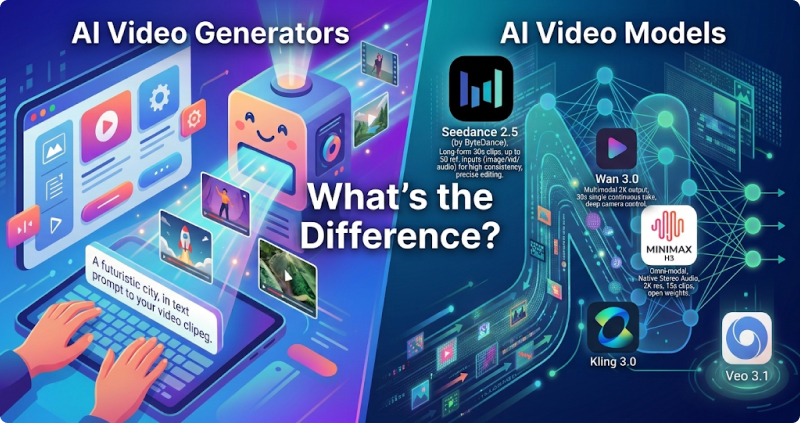
Before diving into AI video generators, it’s important to understand what AI video models are and how they power AI video creation.
What is AI Video Models?
AI video models are the “brains” behind AI video generators. They learn how objects, people, scenes, lighting, and movement work in videos, then use that knowledge to generate new video content.
How AI Video Models Work?
AI video models typically use deep learning technologies, such as diffusion models and transformer architectures, to:
- Understand input: Text prompts, Images, Existing videos, Audio or scripts
- Predict visual content: Generate frames, Maintain character consistency, Simulate camera movement, Create realistic motion
- Produce a video:Combine generated frames, Add movement, effects, and details, Output a complete AI-generated video
AI Video Models vs AI Video Generators
| AI Video Models | AI Video Generators | |
|---|---|---|
| Definition | The underlying AI technology that creates videos | The user-facing tools/apps built with AI models |
| Purpose | Generate and understand video content | Help users easily create videos |
| Users | Developers, researchers, AI companies | Creators, marketers, businesses |
| Example | Runway Gen-4, Google Veo, Kling AI model, Wan 2.5 | Runway, Vidverse AI, Canva AI Video Generator |
Part 2. Best AI Video Generator 2026: 10 Top AI Video Tools Ranked
The best AI video generators depends on your goals, from cinematic storytelling and social media videos to marketing content and beginner-friendly creation.
Below, we rank the 10 best AI video generators of 2026, highlighting why each tool is recommended.
| Rank | AI Video Generator | Key Features | Advantages | Disadvantages |
|---|---|---|---|---|
| 1 | Vidverse AI Video Generator | Text-to-video, image-to-video, AI effects, templates | Easy to use, multiple AI tools in one platform, beginner-friendly | Advanced creators may need more customization |
| 2 | Runway | Text-to-video, AI editing, visual effects | High-quality output, powerful editing features | Learning curve for beginners, limited free credits |
| 3 | Pika | AI animation, image-to-video, video effects | Fun creative effects, easy social media content creation | Less suitable for long-form videos |
| 4 | Kling AI | Cinematic generation, realistic motion, character animation | Excellent realism and motion quality | Generation speed can vary |
| 5 | Canva AI Video Generator | AI templates, video design, editing tools | Extremely easy to use, great templates | Less advanced AI video control |
| 6 | InVideo AI | Script-to-video, ads, YouTube videos | Great for marketers and businesses | AI visuals may require editing |
| 7 | Adobe Firefly Video | AI video generation, creative workflows | Professional ecosystem, strong creative tools | Better suited for experienced users |
| 8 | Pollo AI | Multiple AI video models, creative effects | Supports various AI models in one place | Quality depends on selected model |
| 9 | Pixverse AI | AI effects, image animation, video transformations | Fast generation, popular creative styles | Limited professional editing features |
| 10 | DeeVid AI | Text-to-video, image-to-video | Simple workflow, beginner-friendly | Fewer advanced features |
Part 3. How to Choose the Best AI Video Generator in 2026?
Discover 10 free online AI video generation tools with detailed guides, key features, pros and cons, helping you find the best AI video generator for your needs.
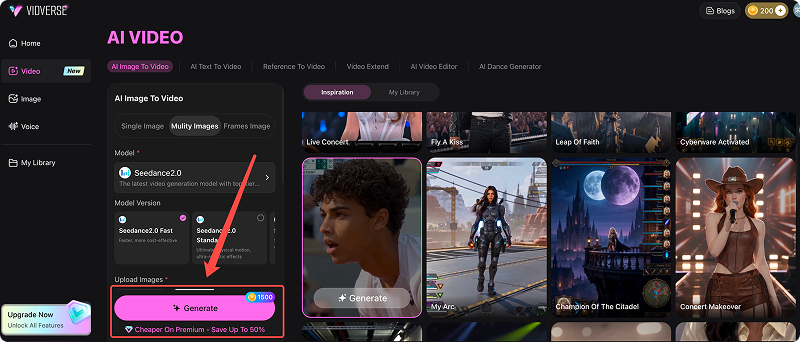
1. Vidverse AI — Best All-in-One AI Video Generator
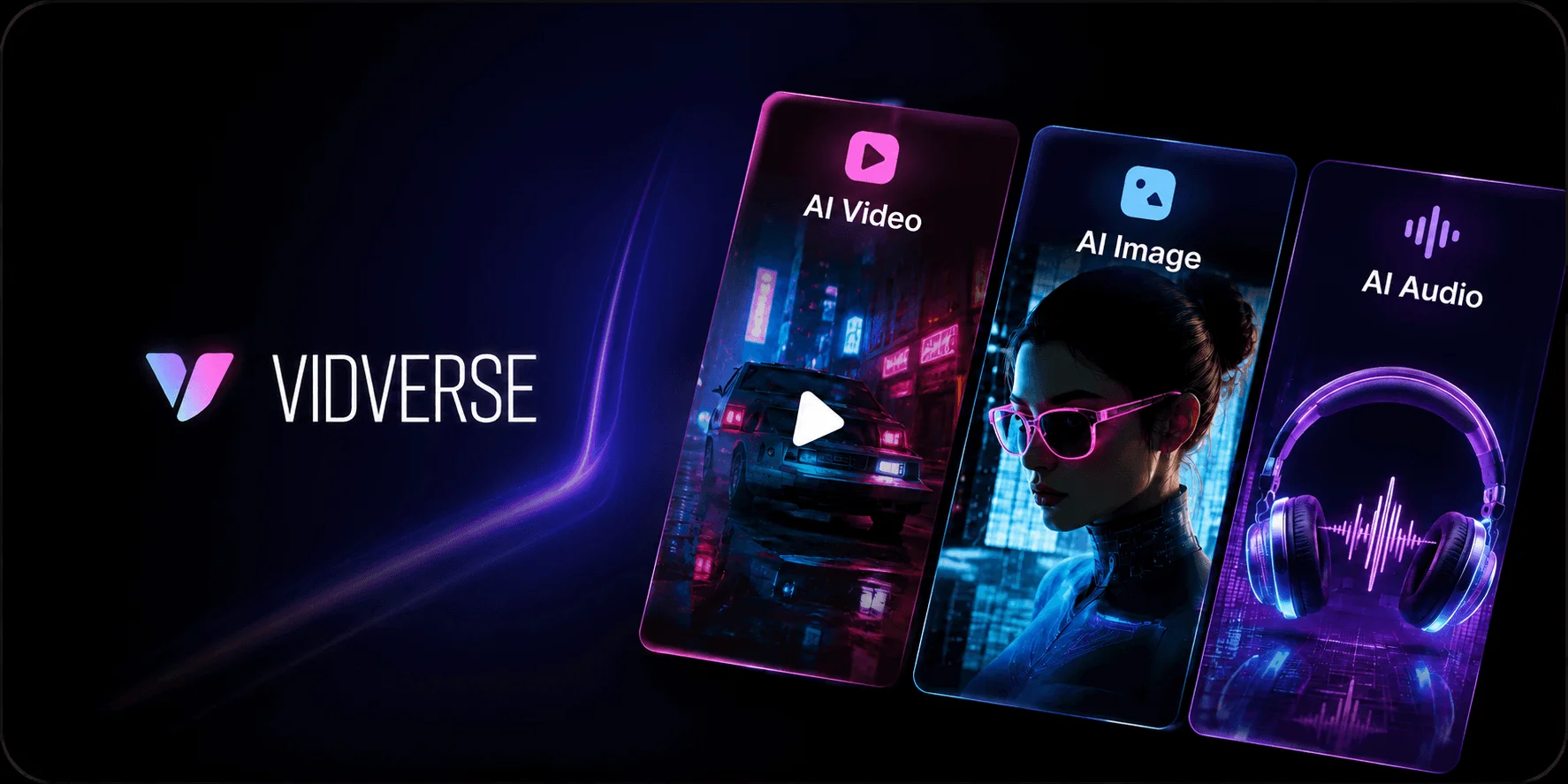
Vidverse AI Video Generator is an AI-powered video creation tool that allows users to generate high-quality videos from text prompts, images, and creative templates. With an easy-to-use interface, it helps beginners and creators produce engaging AI videos quickly without professional editing skills.
Why Choose Vidverse AI?
- No professional editing experience required
- Create videos from simple ideas
- Faster than traditional production workflows
- Suitable for beginners and creators
- Supports multiple AI video creation methods
How to Use Vidverse AI to Create Videos: 4 Simple Steps
Step 1. Choose Your AI Video Creation Method — Create videos with Text-to-Video, Image-to-Video, or AI Templates.
Step 2. Enter Your Prompt or Upload an Image — Provide the content you want Vidverse AI to transform.
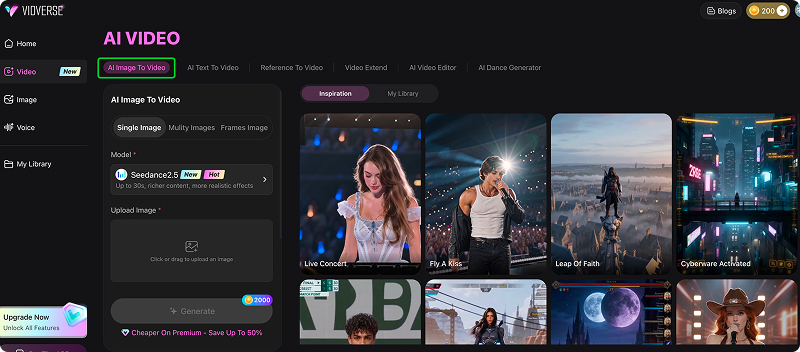
Step 3. Customize Your Video Settings — Adjust video style, aspect ratio, duration, visual effects, and motion effects before generation.
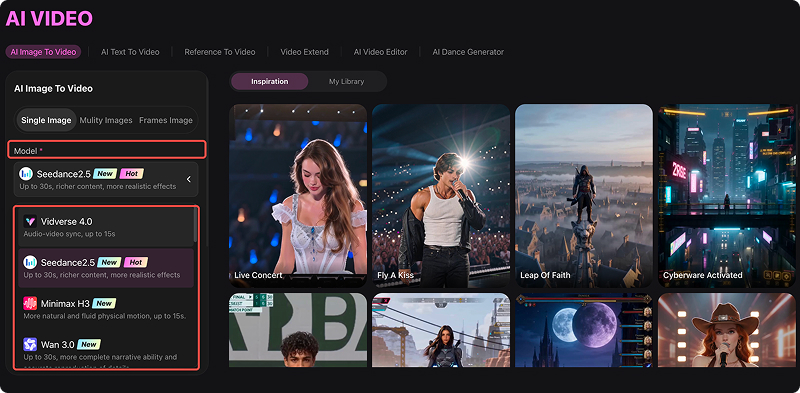
Step 4. Click “Generate” and let Vidverse AI create your video — then review, edit, export, and share your AI creation.
2. Runway — Best for Professional AI Video Creation
Runway AI is a professional AI video generator that helps users create and edit high-quality videos from text, images, and existing footage. It is best for filmmakers, creators, and professionals who need advanced AI video generation and editing capabilities.
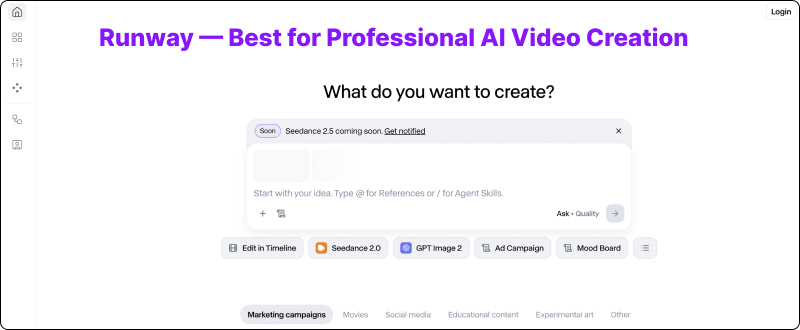
How to Use Runway AI to Create Videos in 5 Simple Steps
Step 1. Select a Runway AI tool such as Text-to-Video, Image-to-Video, or Video-to-Video based on your content needs.
Step 2. Add a detailed text prompt or upload an image or video for Runway AI to transform into a new video.
Step 3. Adjust settings like video duration, aspect ratio, style, and motion effects to match your creative vision.
Step 4. Click the generate button, then preview the AI-generated video and refine it if needed.
Step 5. Use Runway AI’s editing tools to polish your video, then export and share it across your preferred platforms.
3. Pika — Best AI Video Generator for Creative Effects
Pika AI is a creative AI video generator designed for producing engaging videos with unique effects, animations, and transformations. It is best for social media creators, artists, and users who want to quickly create eye-catching AI videos.
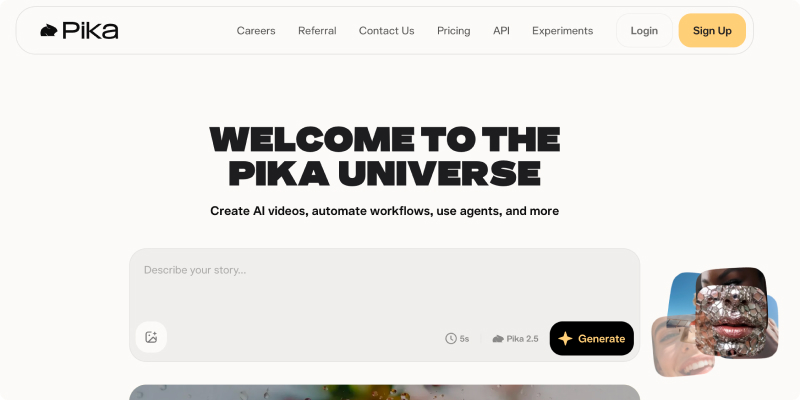
How to Use Pika AI to Create Videos?
Step 1. Select a Pika AI feature such as text-to-video, image-to-video, or video transformation based on the type of content you want to create.
Step 2. Provide a detailed text prompt or upload an image, then describe the style, movement, and effects you want Pika AI to generate.
Step 3. Adjust available settings such as video style, motion effects, duration, and creative transformations to personalize your AI-generated video.
Step 4. Click the generate button to create your video, then review the result and refine your prompt or settings if needed.
Step 5. Make final adjustments to your AI video, export the completed result, and share it on social media platforms or other channels.
4. Kling AI — Best for Realistic AI Videos
Kling AI is an AI video generator focused on creating realistic, cinematic videos with natural motion, making it ideal for users who want high-quality AI-generated scenes and storytelling content. It is best for filmmakers, creators, and businesses that need high-quality AI videos with natural motion, realistic characters, and professional visual effects.
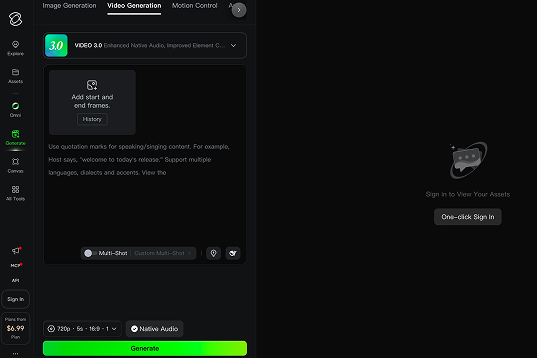
How to Use Kling AI to Create Videos?
Step 1. Select a Kling AI feature such as Text-to-Video or Image-to-Video based on whether you want to create a video from a prompt or animate an existing image.
Step 2. Select a Kling AI feature such as Text-to-Video or Image-to-Video based on whether you want to create a video from a prompt or animate an existing image.
Step 3. Adjust settings such as video duration, aspect ratio, motion effects, and visual style to control the quality and appearance of your AI-generated video.
Step 4. Click the generate button to let Kling AI create your video, then review the result and refine your prompt or settings if necessary.
5. Canva AI Video Generator — Best for Beginners
Canva AI is an AI-powered design and video creation platform that helps users generate professional-looking videos, graphics, and marketing content with simple prompts and templates. It is best for beginners, businesses, and creators who need fast and easy AI-powered content creation.
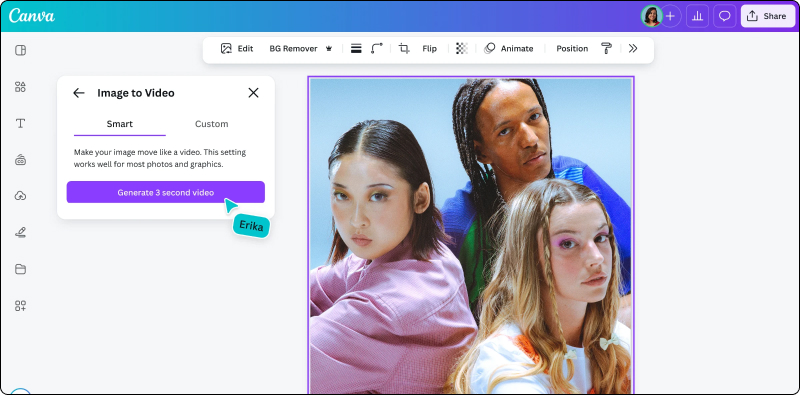
How to Use Canva AI to Create Videos?
Step 1. Select a Canva AI video feature or template that matches your content goal, such as social media videos, marketing videos, presentations, or creative projects.
Step 2. Describe your video idea with a text prompt or upload your own images, videos, and assets for Canva AI to transform into a finished video.
Step 3. Adjust the video style, templates, animations, text, images, music, and other design elements to match your creative needs.
Step 4. Let Canva AI create your video, then preview the result and make changes to improve the visuals, timing, and overall design.
Step 5. Download your completed AI-generated video or share it directly across platforms such as YouTube, TikTok, Instagram, or other channels.
6. InVideo AI — Best AI Video Generator for Marketing
InVideo AI is an AI-powered video generator that transforms text prompts, scripts, and ideas into professional-quality videos with AI-generated visuals, voiceovers, subtitles, and music. It is best for marketers, businesses, educators, and content creators who want to produce high-quality videos quickly and efficiently.
How to generate videos from images using InVideo AI
Step 1. Upload one or more images that you want to turn into a video, then arrange them in the order you want them to appear.
Step 2. Enter a prompt explaining how you want your images to be animated, including the desired style, camera movement, transitions, and overall mood.
Step 3. Adjust settings such as video length, aspect ratio, visual style, background music, voiceover, and subtitles to match your project.
Step 4. Click the generate button to let InVideo AI transform your images into a video, then preview the result and make any necessary adjustments.
Step 5. Export the completed video in your preferred resolution and share it on platforms such as YouTube, TikTok, Instagram, or your website.
7. Adobe Firefly Video — Best for Creative Professionals
Adobe Firefly Video is an AI-powered video generation and editing tool that enables creators to generate, enhance, and transform videos using text prompts and AI features. It is best for creative professionals, designers, and businesses looking for professional AI video production within the Adobe ecosystem.
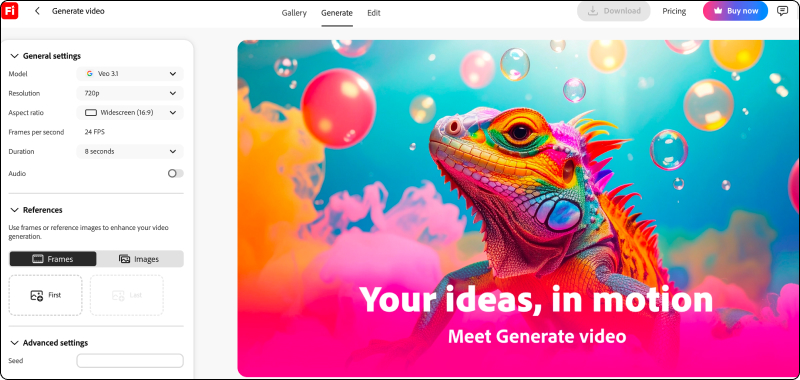
How to Use Adobe Firefly to Create and Edit Videos
Step 1. Select an Adobe Firefly video tool, such as text-to-video or AI-powered video editing features, based on whether you want to create a new video or modify existing footage.
Step 2. Describe your desired video using a detailed text prompt or upload images and video clips that you want Adobe Firefly to generate or edit.
Step 3. Adjust options such as visual style, camera movement, aspect ratio, duration, and creative effects to match your project requirements.
Step 4. Let Adobe Firefly create or edit your video, then review the result and refine the prompt, settings, or visual elements to improve the final output.
Step 5. Export your AI-generated video or continue refining it with Adobe’s creative tools to add professional edits, effects, and finishing touches.
8. Pollo AI — Best Multi-Model AI Video Platform
Pollo AI is a multi-model AI video generator that allows users to create and transform videos using different AI models, text prompts, and images. It is best for creators and AI enthusiasts who want to explore multiple video generation styles and creative effects in one platform.
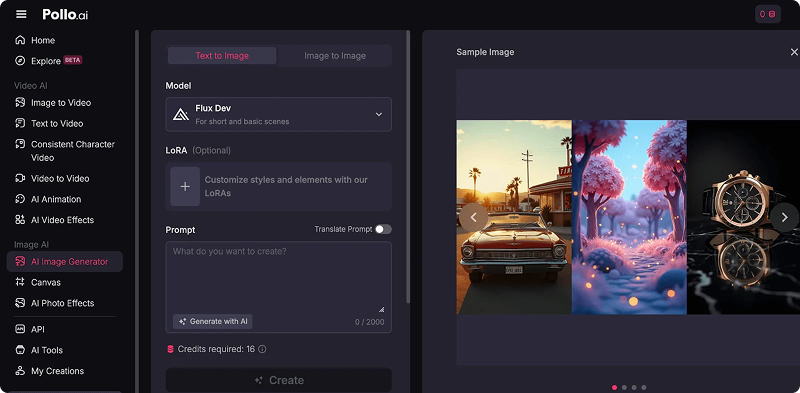
How to Use Pollo AI to Generate Videos?
Step 1. Select a Pollo AI video generation feature, such as Text-to-Video, Image-to-Video, or AI video effects, based on the type of video you want to create.
Step 2. Add a detailed text prompt or upload an image, then describe the scene, style, motion, and visual effects you want Pollo AI to generate.
Step 3. Choose an available AI model and adjust settings such as video style, duration, aspect ratio, and motion effects to customize your generated video.
Step 4. Click the generate button to let Pollo AI create your video, then preview the result and refine your prompt or settings if the output does not match your expectations.
Step 5. Make final adjustments to your AI-generated video, export the completed result, and share it on social media, websites, or other platforms.
9. Pixverse AI — Best for Viral AI Video Effects
Pixverse AI is a creative AI video generator that helps users create engaging videos from text prompts and images. It is best for social media creators, beginners, and users who want to produce viral-style videos with AI effects and animations quickly.
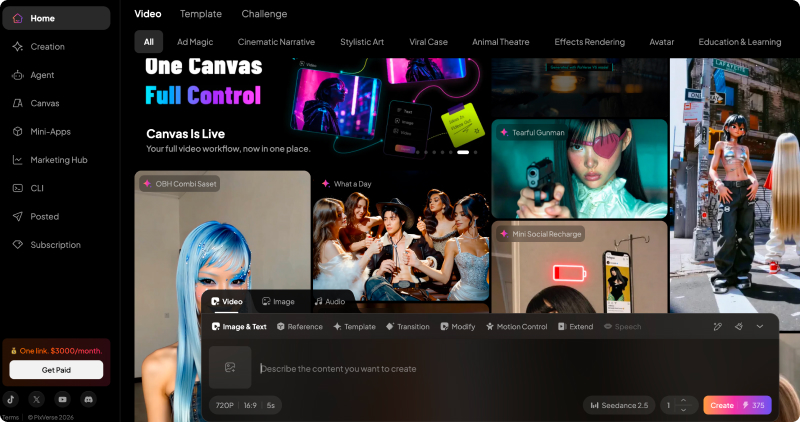
How to Use Pixverse AI to Generate Videos in 5 Simple Steps
Step 1. Select a Pixverse AI feature such as Text-to-Video, Image-to-Video, or AI video effects based on the type of content you want to create.
Step 2. Add a detailed text prompt or upload an image, then describe the scene, motion, style, and effects you want Pixverse AI to generate.
Step 3. Adjust settings such as video style, duration, aspect ratio, motion effects, and visual elements to personalize your AI-generated video.
Step 4. Click the generate button to let Pixverse AI create your video, then preview the result and refine your prompt or settings if needed.
Step 5. Download the completed AI-generated video and share it on platforms such as TikTok, Instagram, YouTube Shorts, or other social media channels.
10. DeeVid AI — Best Simple AI Video Generator
DeeVid AI is an easy-to-use AI video generator that turns text, images, and videos into creative AI-generated content, making it suitable for beginners, social media creators, and marketers. It is s best for fast AI video creation, social media content, image animation, and creative video effects.
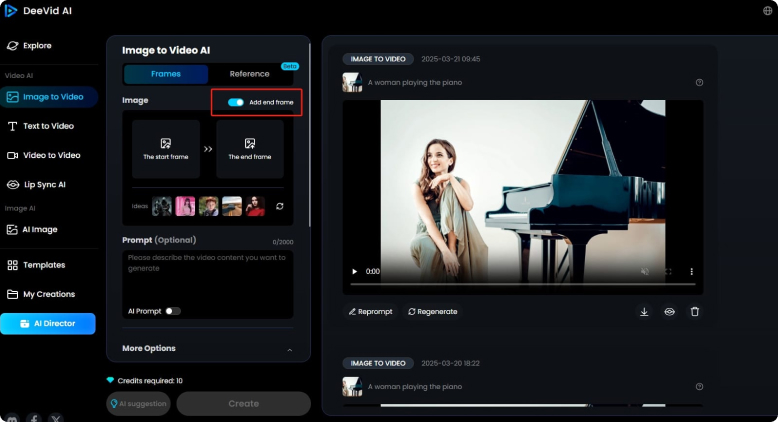
How to Use DeeVid AI to Generate Videos
Step 1. Select a DeeVid AI feature such as Text-to-Video, Image-to-Video, or AI video effects based on the type of video you want to create.
Step 2. Upload your image or enter a detailed text prompt describing the scene, style, motion, and effects you want DeeVid AI to generate.
Step 3. Adjust settings such as video style, duration, aspect ratio, animation effects, and other creative options to personalize your AI-generated video.
Step 4. Click the generate button to let DeeVid AI create your video, then preview the result and refine your settings or prompt if needed.
Step 5. Download your completed AI-generated video and share it on platforms such as TikTok, Instagram, YouTube Shorts, or other social media channels.
Part 4. FAQs about AI Video Generator
Q1. Are Free AI Video Generators Worth Using in 2026?
Yes, free AI video generators are worth using in 2026 for beginners, creators, and users who want to quickly explore AI video creation. They provide an affordable way to generate videos, test ideas, and create social media content.
For most beginners, starting with a free AI video generator is a practical way to experience AI-powered video creation before investing in premium features.
Q2. Can I create AI videos without paying?
Yes, you can create AI videos for free using tools like Vidverse AI, which offers free access to generate videos from text prompts, images, or existing videos without a subscription.
Q3. What is the best free AI video generator?
The best free AI video generator depends on your needs, such as video quality, ease of use, creative features, and available free credits. In 2026, many AI video tools offer free plans or limited free access, allowing users to create videos from text prompts, images, and existing footage without paying.
Q4. Which AI video generator creates the most realistic videos?
The most realistic AI video generator depends on the type of realism you need, such as human movement, cinematic scenes, physics simulation, or overall visual quality. In 2026, leading AI video generators such as Kling AI, Runway, Google Veo, and Sora are known for producing highly realistic AI-generated videos.
Q5. Can AI generate videos from images?
Yes, Vidverse AI can generate videos from images using AI-powered image-to-video technology. Users can upload a static image, and Vidverse AI can transform it into a dynamic video by adding realistic motion, camera movements, animations, and visual effects.
Conclusion
In this guide, we reviewed the 10 best free AI video generators in 2026, including their key features, advantages, disadvantages, and usage guides. We hope it helps you find the best AI video tool for your creative needs. Among them, Vidverse AI is the top choice for beginners, offering an easy-to-use interface and free AI video generation.
'%3e%3crect%20y='2.1906'%20width='26'%20height='17.4314'%20rx='1.55981'%20fill='white'/%3e%3c/g%3e%3crect%20x='0.311961'%20y='2.50256'%20width='25.3761'%20height='16.8075'%20rx='1.24784'%20stroke='%2322257C'%20stroke-width='0.623922'/%3e%3c/g%3e%3crect%20x='13.078'%20y='15.5656'%20width='10.8016'%20height='2.49569'%20rx='0.623922'%20fill='%2366B3FF'%20stroke='%2322257C'%20stroke-width='0.623922'/%3e%3crect%20x='-0.311961'%20y='0.311961'%20width='10.8016'%20height='2.49569'%20rx='0.623922'%20transform='matrix(-1%200%200%201%2012.61%2015.2536)'%20fill='%2366B3FF'%20stroke='%2322257C'%20stroke-width='0.623922'/%3e%3crect%20x='10.3093'%20y='13.3231'%20width='4.91339'%20height='6.98013'%20rx='2.45669'%20fill='%2322257C'/%3e%3cpath%20d='M18.9174%200.31543C20.5962%200.268025%2022.1261%200.655527%2023.9487%201.55762C24.0483%201.60695%2024.1137%201.71153%2024.1137%201.8291V16.502C24.1137%2016.7236%2023.8763%2016.891%2023.6499%2016.7979C21.803%2016.0377%2020.2158%2015.6963%2018.4975%2015.7705C16.8915%2015.8399%2015.1907%2016.2732%2013.0776%2017.0332V1.6709C15.4678%200.825877%2017.2746%200.36187%2018.9174%200.31543Z'%20fill='white'%20stroke='%2322257C'%20stroke-width='0.623922'/%3e%3cpath%20d='M15.3008%204.57C16.3536%203.94578%2019.2783%203.20503%2021.8909%203.94608'%20stroke='%2366B3FF'%20stroke-width='0.935883'%20stroke-linecap='round'/%3e%3cpath%20d='M15.3008%207.26054C16.3536%206.63631%2019.2783%205.89557%2021.8909%206.63661'%20stroke='%2366B3FF'%20stroke-width='0.935883'%20stroke-linecap='round'/%3e%3cpath%20d='M15.3008%209.95107C16.3536%209.32684%2019.2783%208.5861%2021.8909%209.32714'%20stroke='%2366B3FF'%20stroke-width='0.935883'%20stroke-linecap='round'/%3e%3cpath%20d='M15.3008%2012.6398C16.3536%2012.0156%2019.2783%2011.2749%2021.8909%2012.0159'%20stroke='%2366B3FF'%20stroke-width='0.935883'%20stroke-linecap='round'/%3e%3cpath%20d='M7.08257%200.31543C5.40384%200.268025%203.87393%200.655527%202.05132%201.55762C1.95165%201.60695%201.88628%201.71153%201.88628%201.8291V16.502C1.88628%2016.7236%202.12373%2016.891%202.35014%2016.7979C4.19702%2016.0377%205.78418%2015.6963%207.50249%2015.7705C9.10852%2015.8399%2010.8093%2016.2732%2012.9224%2017.0332V1.6709C10.5322%200.825877%208.72541%200.36187%207.08257%200.31543Z'%20fill='white'%20stroke='%2322257C'%20stroke-width='0.623922'/%3e%3cpath%20d='M10.6992%204.57C9.64638%203.94578%206.72175%203.20503%204.10907%203.94608'%20stroke='%2366B3FF'%20stroke-width='0.935883'%20stroke-linecap='round'/%3e%3cpath%20d='M10.6992%207.26054C9.64638%206.63631%206.72175%205.89557%204.10907%206.63661'%20stroke='%2366B3FF'%20stroke-width='0.935883'%20stroke-linecap='round'/%3e%3cpath%20d='M10.6992%209.95107C9.64638%209.32684%206.72175%208.5861%204.10907%209.32714'%20stroke='%2366B3FF'%20stroke-width='0.935883'%20stroke-linecap='round'/%3e%3cpath%20d='M10.6992%2012.6398C9.64638%2012.0156%206.72175%2011.2749%204.10907%2012.0159'%20stroke='%2366B3FF'%20stroke-width='0.935883'%20stroke-linecap='round'/%3e%3c/g%3e%3cdefs%3e%3cfilter%20x='0'%20y='2.1906'%20width='26'%20height='17.4314'%20filterUnits='userSpaceOnUse'%20color-interpolation-filters='sRGB'%3e%3cfeFlood%20flood-opacity='0'%20result='BackgroundImageFix'/%3e%3cfeBlend%20mode='normal'%20in='SourceGraphic'%20in2='BackgroundImageFix'%20result='shape'/%3e%3cfeColorMatrix%20in='SourceAlpha'%20type='matrix'%20values='0%200%200%200%200%200%200%200%200%200%200%200%200%200%200%200%200%200%20127%200'%20result='hardAlpha'/%3e%3cfeOffset%20dy='-1.24784'/%3e%3cfeComposite%20in2='hardAlpha'%20operator='arithmetic'%20k2='-1'%20k3='1'/%3e%3cfeColorMatrix%20type='matrix'%20values='0%200%200%200%200.572549%200%200%200%200%200.768627%200%200%200%200%200.976471%200%200%200%201%200'/%3e%3cfeBlend%20mode='normal'%20in2='shape'%20result='effect1_innerShadow_0_4'/%3e%3c/filter%3e%3c/defs%3e%3c/svg%3e)