
Google Nano Banana 2.1 (October 2026) and OpenAI GPT Image 2.5 (September 2026) represent the latest in AI image generation. Which model delivers better results from the same prompt? This guide compares Nano Banana 2.1 vs. GPT Image 2.5 across features and real-world scenarios, revealing how to test both in one place and choose the best option for your workflow.
Part 1. Nano Banana 2.1 vs GPT Image 2.5: Which Is Better?
When deciding between Google's Nano Banana 2.1 and ChatGPT GPT Image 2.5, the choice depends on your production priorities: Nano Banana 2.1 focuses on fast generation speed, precise literal adherence, high-resolution rendering, and live Google Search grounding. GPT Image 2.5 excels in art direction, stylistic richness, dedicated transparent-background output, and targeted multi-image reference editing.
Part 2. What Are Nano Banana 2.1 and GPT Image 2.5?
Google's Nano Banana 2.1 and OpenAI's GPT Image 2.5 are state-of-the-art AI image generation models designed to create and edit visuals from text prompts or reference photos.
While both serve creative workflows, each generator relies on a distinct model architecture and targets different technical priorities:
What is Nano Banana 2.1?
Developed as part of Google’s Gemini 3.6 image ecosystem, Nano Banana 2.1 is built for high-speed, factual, and high-resolution visual creation. It is ideal when you need fast 4K rendering, strict literal prompt adherence, banners/panoramas, or real-world web facts.
What is GPT Image 2.5?
Released as OpenAI's flagship image generation family, GPT Image 2.5 focuses on precise subject continuity, rich art direction, and native layer editing. GPT Image 2.5 offers two mode tiers.
- GPT Image 2.5 Flare: A lightweight, high-speed model optimized for rapid drafts, social media content, and lower latency.
- GPT Image 2.5 Sunburst: A precision-focused base model designed for heavy detail, exact atmospheric styling, and complex multi-turn editing.
Part 3. Nano Banana 2.1 vs GPT Image 2.5: Quick Comparison
Here is a quick comparison breakdown between Google's Nano Banana 2.1 and ChatGPT Image 2.5:
| Feature | Nano Banana 2.1 | GPT Image 2.5 |
|---|---|---|
| Model Tiers | Single unified model (Gemini 3.6 Flash lineage) | Flare (Fast/everyday) & Sunburst (High-precision/detail) |
| Maximum Native Resolution | Native 4K (up to ~16 MP) | Native 2K |
| Generation Speed | ~5x faster (median ~19s for 1K) | Slower, more iterative (Sunburst high: ~100s+) |
| Aspect Ratio Options | Ultra-wide (up to 8:1 panoramas & 1:8 strips) | 9 standard ratios (up to 21:9) |
| Multi-Image References | Accepts up to 9–14 reference images | Accepts up to 16 reference images |
| Transparent PNG Output | No (requires post-processing cutouts) | Yes (Native transparent background support) |
| Image Quality | Detailed visuals and polished compositions | Realistic textures and natural lighting |
| Text Rendering | Strong for infographics and text-heavy designs | Effective for instruction-driven text and layouts |
| Editing | Reference-based transformations and prompt edits | Precise, targeted edits and iterative refinement |
| Consistency | Useful for maintaining characters across references | Strong at preserving key details during revisions |
| Live Web Search Grounding | Yes (Grounds outputs in live Google Search results) | No |
| Best Use Cases | Infographics, reference-based images, character consistency | Photorealism, detailed edits, and controlled creative workflows |
Strengths of Google's Nano Banana 2.1
- Strict Prompt Adherence & Speed: Nano Banana 2.1 generates images significantly faster than GPT Image 2.5's Sunburst tier while following prompts literally without adding unsolicited artistic elements or text.
- 4K & Extreme Aspect Ratios: Capable of rendering native 4K outputs and extreme dimensions (such as 8:1 banners or 1:8 vertical strips) without tiling artifacts.
- Real-World & Web Search Grounding: Integrates live Google Search data directly into the image generation process, making it ideal for historically accurate scenes, current weather depictions, or up-to-date real-world details.
- Configurable Reasoning (Thinking): Offers adjustable "thinking levels" to balance rapid, lower-cost output with high-level reasoning for complex compositions and infographics.
Strengths of OpenAI's GPT Image 2.5
- Rich Art Direction & Aesthetics: GPT Image 2.5 produces deeply styled, textured, and atmospheric visuals out-of-the-box, often generating complete studio-ready artwork with minimal prompt engineering.
- Flexible Dual-Tier System: Features Flare for fast, low-latency drafts and product photos, and Sunburst for maximum editing precision and intricate detail rendering.
- Targeted In-Context Editing: Exceptional at preserving identity, subjects, and background continuity across up to 16 reference images during multi-turn image edits.
- Native Transparency: Supports true PNG/WebP transparent background generation, making it well-suited for assets, sticker design, UI labels, and e-commerce product tiles.
Part 4. Nano Banana 2.1 vs GPT Image 2.5: Same-Prompt Image Test
Nano Banana 2.1 vs. GPT Image 2.5 comes down to image quality, prompt accuracy, text rendering, and editing capabilities. Compare both AI image generators using the same prompts to see which delivers more realistic visuals, follows instructions more closely, handles text and complex layouts better, and makes more precise edits. The best choice depends on your creative needs, workflow, and budget.
Comparing them with the same prompts is a practical way to determine which best fits your needs.
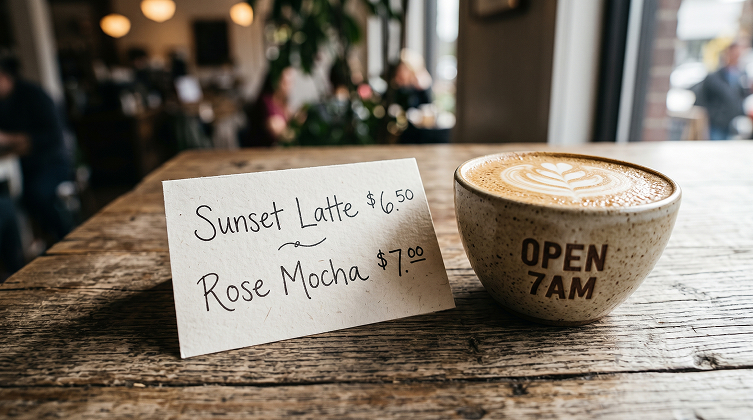
Test 1. Text Rendering & Layout Precision
Prompt: A close-up of a coffee shop menu on a wooden table. The menu features handwritten English text reading “Sunset Latte $6.50” and “Rose Mocha $7.00.” Beside it sits a cup of latte art with “OPEN 7AM” printed on the cup. Natural lighting, shallow depth of field, 4K resolution.
| Nano Banana 2.1 | GPT Image 2.5 |
|---|---|
 | 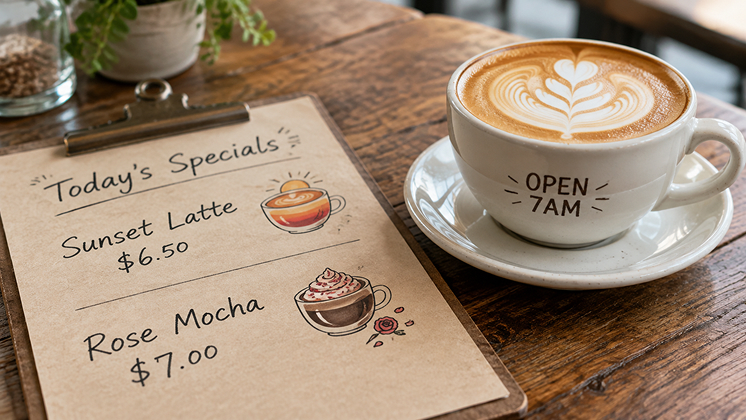 |
Free Text to Image AI Generator
Test 2. Multiple Subjects & Spatial Relationships
Prompt: An ultra-photorealistic, wide-angle landscape photograph of the Sahara Desert at dusk, with vast, rolling sand dunes stretching to the horizon in rich golden-red, burnt orange, and deep amber hues beneath a cloudless twilight sky. Elegant, sharply defined dune crests separate sunlit slopes from deep, cool shadows. In the middle distance, exactly five anatomically accurate camels walk in single file along a gently curving dune ridge at natural, consistent intervals, each clearly distinguishable with recognizable humps, slender legs, and realistic walking postures. Their crisp silhouettes stand against the glowing sky, emphasizing the vastness and solitude of the desert.
| Nano Banana 2.1 | GPT Image 2.5 |
|---|---|
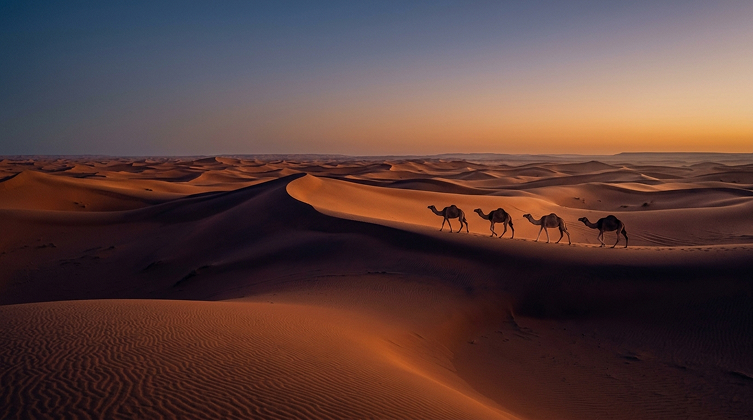 | 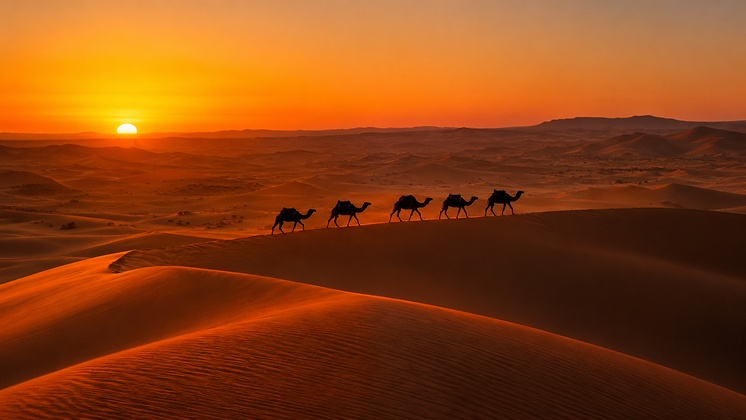 |
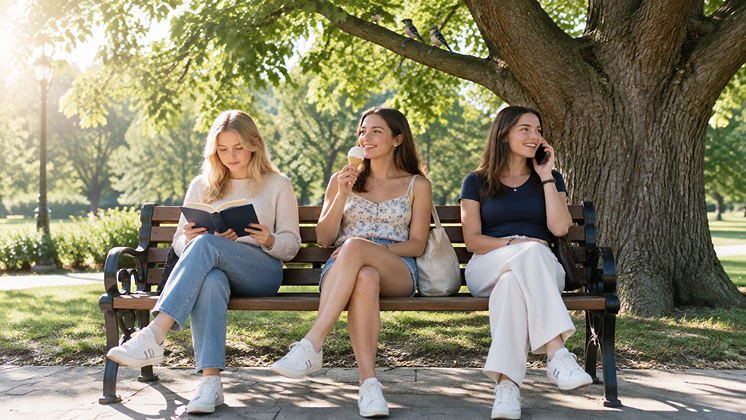
Prompt: Three American girls are sitting on a park bench. The girl on the left is reading a book, the girl in the middle is eating ice cream, and the girl on the right is talking on the phone. A large tree stands behind the bench, with two birds perched on its branches. Sunlight streams in from the left, casting distinct shadows on the ground.
| Nano Banana 2.1 | GPT Image 2.5 |
|---|---|
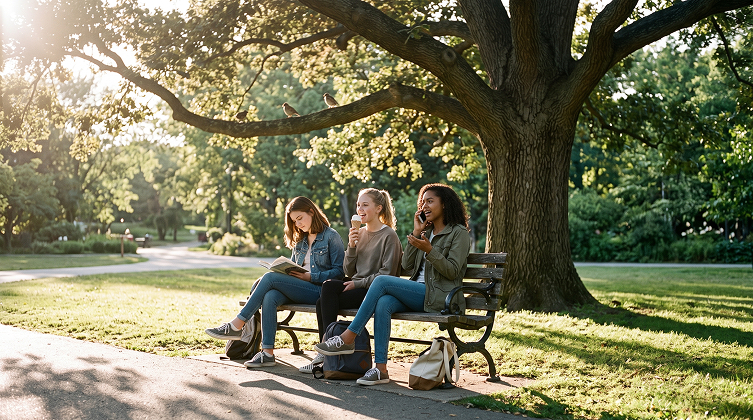 |  |
Test 3. Realism & Skin Texture
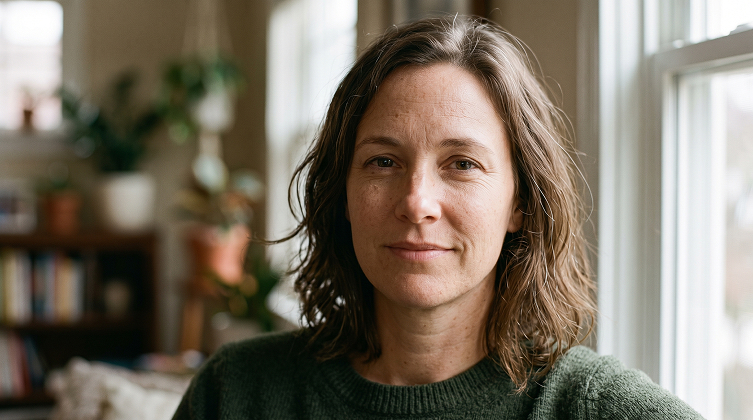
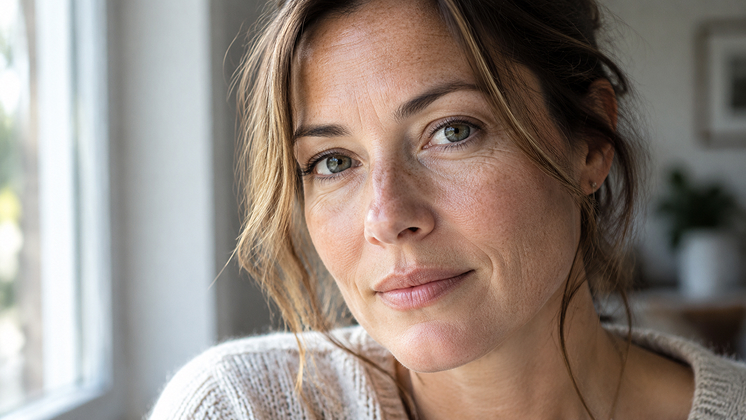
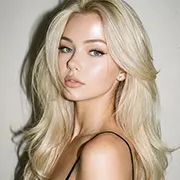
Prompt: A close-up portrait of a 40-year-old woman, illuminated by natural light streaming through a window. Fine lines, visible pores, and subtle freckles give her skin a realistic glow, with no skin smoothing or retouching. Her expression is calm, with a few loose strands of hair framing her face. Blurred background.
| Nano Banana 2.1 | GPT Image 2.5 |
|---|---|
 |  |
Text to Image Online
Test 4. Hands & Complex Actions
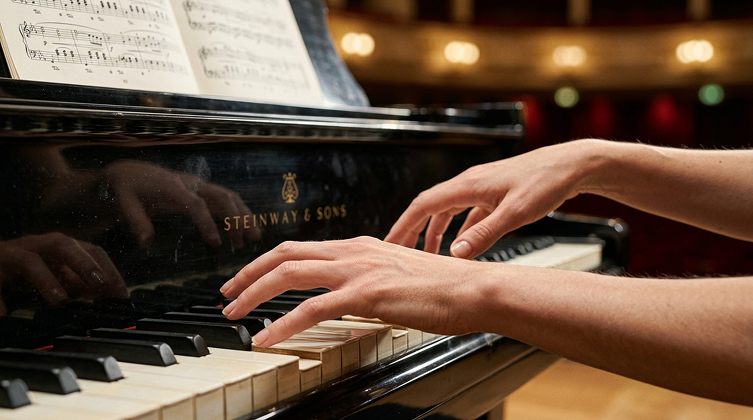
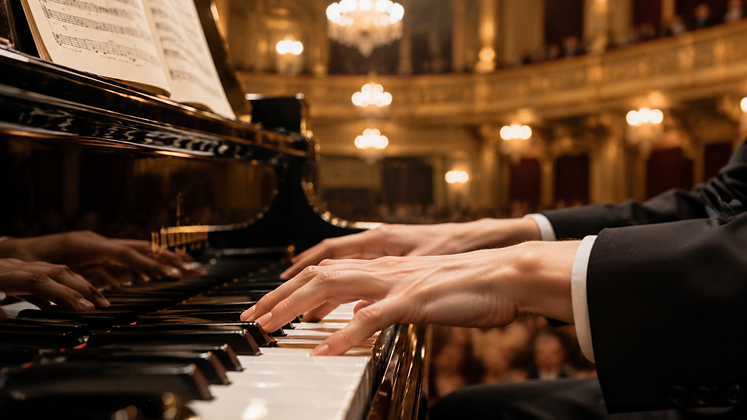
Prompt: At the Vienna Musikverein, a pianist’s hands playing the piano, with long, slender fingers pressing multiple keys. Sheet music rests on the music stand, while the concert hall lights blur softly in the background. Close-up shot, shallow depth of field.
| Nano Banana 2.1 | GPT Image 2.5 |
|---|---|
 |  |
Test 5. Style Consistency & Prompt Adherence
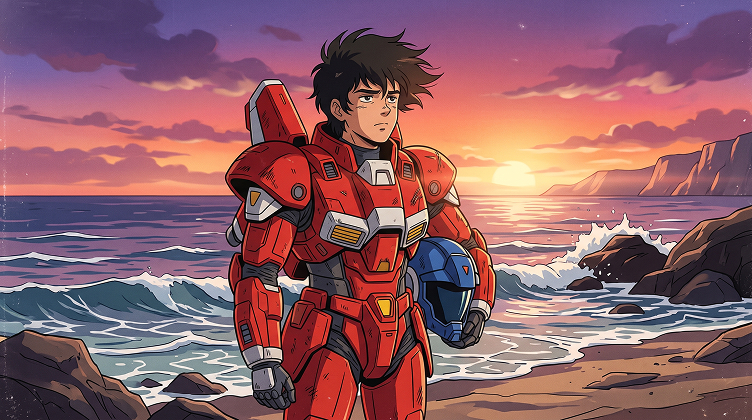
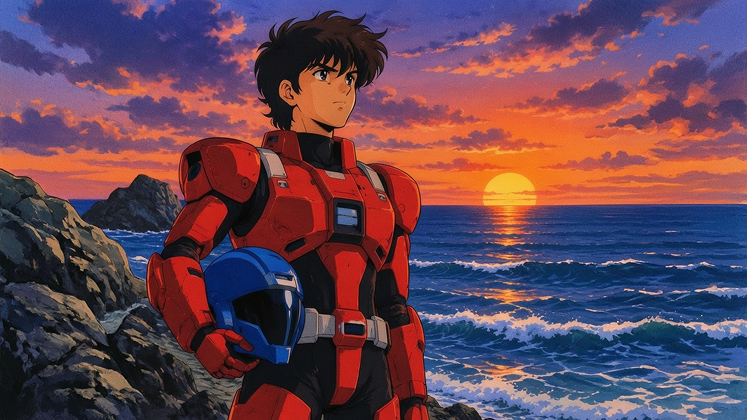
Prompt: A retro 1980s Japanese anime-style illustration of a teenage boy wearing red mecha armor, standing by the sea. The sunset features orange and purple hues, and the ocean waves have a distinct cel-shaded look. Add subtle film grain. The boy is holding a blue helmet in his hand.
| Nano Banana 2.1 | GPT Image 2.5 |
|---|---|
 |  |
Text to Image Online
Test 6. Natural Lighting and Shadows
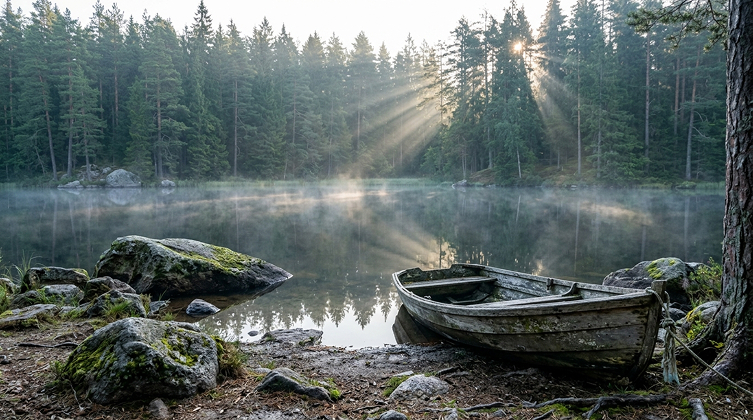
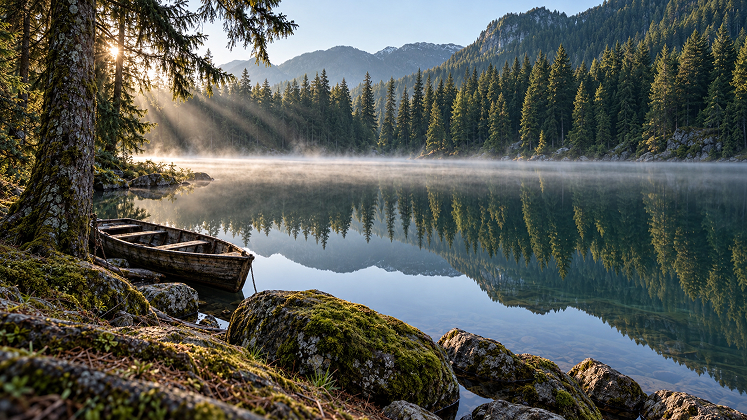
Prompt: Early morning at a lake surrounded by a coniferous forest. The water is calm as a mirror, reflecting the trees on the opposite shore. Thin mist floats above the surface, while sunlight streams diagonally through gaps in the trees, creating visible shafts of light. Several moss-covered rocks sit in the foreground, and an old wooden boat rests along the shore. Cool green tones, ultra-photorealistic, 4K resolution.
| Nano Banana 2.1 | GPT Image 2.5 |
|---|---|
 |  |
Part 5. Nano Banana 2.1 vs. GPT Image 2.5: Speed, Quality, Cost & Access
Choosing an AI image generator involves more than image quality. Generation speed, output resolution, cost per image, and how easily you can access the model all affect your workflow.
Here is a concise comparison table followed by a detailed breakdown of Google's Nano Banana 2.1 and OpenAI's GPT Image 2.5 across speed, quality, cost, and access.
| Feature / Metric | Google Nano Banana 2.1 | OpenAI GPT Image 2.5 |
|---|---|---|
| Speed (Inference) | Faster & Low-Latency (~10–12s for 1K, ~20s for 4K) | Tiered (~8–12s on Flare; 30–60s+ on Sunburst) |
| Max Resolution & Ratios | Native 4K (~16 MP); supports extreme ratios (8:1 to 1:8) | Up to 4K; standard aspect ratios up to 21:9 |
| Key Quality Features | Live Google Search grounding; strict prompt adherence | Art-directed realism; native transparent PNG/WebP layers |
| API Cost Structure | Fixed per-resolution tiers ($0.0336 to $0.0756 per image) | Token-tiered pricing (~$0.006 to $0.21+ depending on quality) |
| Ecosystem Access | Gemini Web/App & Google AI Studio / Vertex AI (gemini-nano-banana-2.1) | ChatGPT (Plus/Team/Pro) & OpenAI API (flare / sunburst) |
Generation Speed
Nano Banana 2.1
Built for rapid execution, averaging about 10 to 12 seconds for standard 1K outputs and under 20 seconds for full 4K renders. It also includes adjustable "Thinking Levels" (Minimal, Medium, High), letting developers dial back reasoning overhead when high-speed drafting is required.
GPT Image 2.5
Uses a split-tier architecture that trades speed for precision depending on the chosen model. The Flare variant handles lightweight, low-latency tasks quickly, whereas the heavy-duty Sunburst base model requires significantly more processing time (30 to 60+ seconds) for complex multi-turn edits and fine detail rendering.
Image Quality & Core Capabilities
Nano Banana 2.1
Focuses on native high-resolution output (up to 4K without tiling artifacts), extreme panoramas or vertical strips (ranging from 8:1 to 1:8), and live Google Search grounding. This search integration ensures that historically accurate scenes, current events, and real-world locations match real-world facts.
GPT Image 2.5
Prioritizes top-tier aesthetic realism, rich art direction, and advanced workflow utilities. It stands out by supporting native transparent background generation (alpha channels) and maintaining strict subject consistency across up to 16 reference images during multi-turn editing sessions.
Cost & API Pricing
Nano Banana 2.1
Operates on a predictable per-image cost model based on resolution tier—running roughly $0.0336 for 1K, $0.0504 for 2K, and $0.0756 for 4K. Utilizing batch processing API endpoints can cut these generation costs in half.
GPT Image 2.5
Relies on a token-based output structure ($30 per 1M image-output tokens) that scales with quality tiers. Simple low-to-medium quality generations cost around $0.006 to $0.013 per image, while maximum precision settings (XHigh / Max) can exceed $0.09 to $0.21+ per output.
Access & Availability
Nano Banana 2.1
Available to consumers via the Gemini web and mobile applications, and accessible to developers through Google AI Studio and Google Cloud Vertex AI under the model identifier gemini-nano-banana-2.1.
GPT Image 2.5
Accessible to consumers via ChatGPT subscriptions (Plus, Team, Enterprise, and Pro), and integrated into the OpenAI developer API using specific variant endpoints like gpt-image-2.5-flare and gpt-image-2.5-sunburst.
Part 6. Which Should You Choose: Nano Banana 2.1 or GPT Image 2.5?
Choosing between Google’s Nano Banana 2.1 and OpenAI’s GPT Image 2.5 comes down to your specific visual production needs, technical constraints, and workflow requirements.
Quick Decision Summary
| If your primary goal is... | Recommended Generator | Key Reason |
|---|---|---|
| Banners, Panoramas & 4K Displays | Nano Banana 2.1 | Native 4K rendering and support for extreme aspect ratios (up to 8:1 / 1:8). |
| Transparent UI Assets & E-Commerce | GPT Image 2.5 | Built-in alpha-channel output for instant transparent PNGs. |
| Factual & Real-World Visuals | Nano Banana 2.1 | Live Google Search grounding ensures up-to-date real-world accuracy. |
| Sequential Storyboarding & Consistency | GPT Image 2.5 | In-context editing tracks character identity across up to 16 reference images. |
| High-Volume, Low-Cost Batching | Nano Banana 2.1 | Flat per-image API rates with 50% batch discounts. |
Here is a simple decision guide to help you choose the right tool for your project:
Choose Google's Nano Banana 2.1 if:
- You need real-world facts and live search data: You are generating images of current events, real-world landmarks, local weather, up-to-date products, or historically accurate scenes that require live web grounding.
- You require native 4K resolution or extreme formats: You need crisp, high-resolution visuals up to 4K (~16 MP) without tiling artifacts, or extreme canvas aspect ratios like 8:1 header banners or 1:8 vertical display strips.
- You want fast, predictable API pricing: You are running high-volume applications where fixed per-image resolution pricing ($0.0336 for 1K, $0.0756 for 4K) or batch processing (50% discount) keeps costs manageable.
- You prefer literal prompt adherence: You want the model to follow your exact prompt text precisely without adding unsolicited artistic flares or extra decorative text.
Choose OpenAI's GPT Image 2.5 if:
- You need native transparent background layers: You are creating logos, UI elements, sticker assets, or e-commerce product shots that require direct PNG/WebP exports with true alpha transparency.
- You perform complex, multi-turn editing: You need to maintain subject identity, character facial features, furniture, or lighting consistency across multiple sequential revision steps using up to 16 reference images.
- You want rich, studio-grade art direction out-of-the-box: You need highly atmospheric photorealism, artistic styling, and cinematic lighting with minimal manual prompt engineering.
- You need dual-speed flexibility: You want to switch seamlessly between a low-latency draft model (Flare) and a high-precision, detail-heavy render engine (Sunburst).
Part 7. Compare Nano Banana 2.1 vs. GPT Image 2.5 in One Place
Vidverse AI Image Generator lets you explore multiple AI image generation models on one platform, making it easy to compare results without switching between tools. You can generate images from text prompts or transform existing images with AI. Follow these five steps to get started:
Step 1: Open Vidverse AI Image Generator
Visit Vidverse AI and open the AI Image Maker. Sign in to access image-generation features.
Instantly Create Images from Text
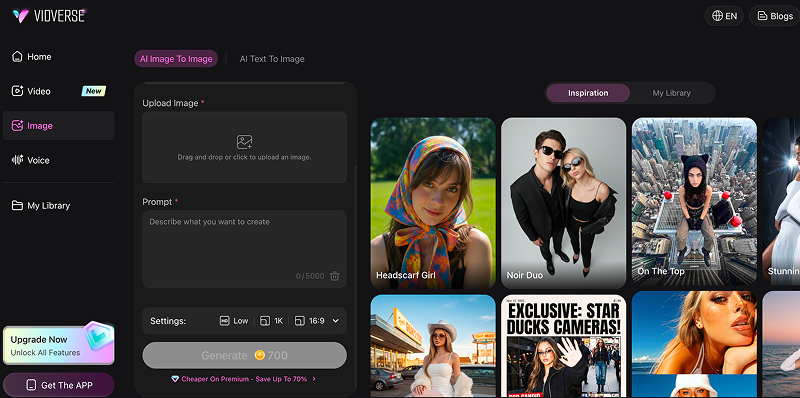
Step 2: Choose an Image Generation Mode
Select Text to Image to create a new image from a description, or Image to Image to transform an existing picture.
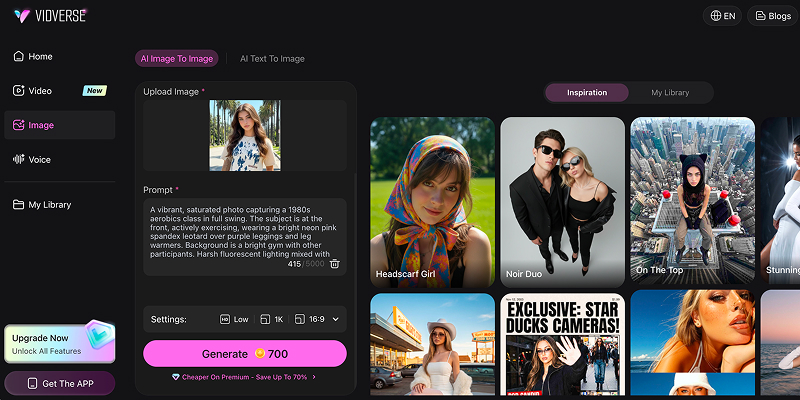
Step 3: Select a Model and Enter Your Prompt
Choose an available AI model and describe the image you want. Include the subject, setting, art style, lighting, composition, and important details.
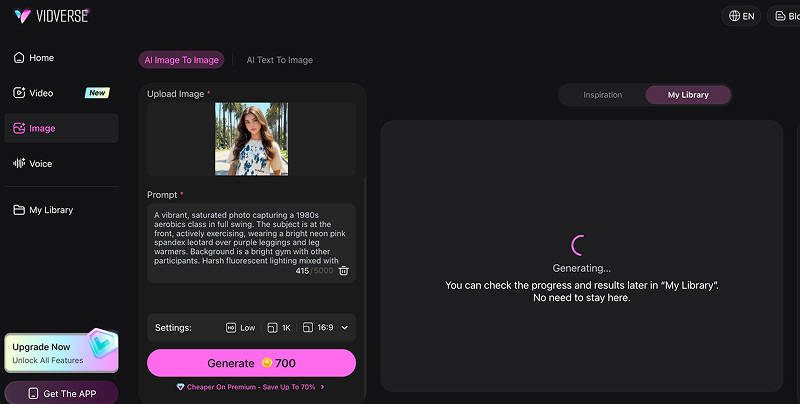
Step 4: Generate and Refine Your Image
Click Generate to create your image. Review the result and adjust your prompt or settings if you want a different style or composition.
To compare Nano Banana 2.1 and GPT Image 2.5, open the Vidverse AI image generator, select a model if it is available in the model list, and enter the same prompt or upload the same reference image. Generate both images, then compare visual quality, prompt accuracy, text rendering, and editing precision.
You can refine your prompts and repeat the test to find the model that best suits your creative needs.
Part 8. FAQs About Nano Banana 2.1 vs GPT Image 2.5
Which model generates more realistic images?
Both models can generate photorealistic images, but their results vary by prompt and scene. In one recent side-by-side test, GPT Image 2.5 Flare produced slightly more convincing lighting and depth in a photographic scene, while Nano Banana 2.1 delivered a strong product image with accurate composition.
Which is better for AI image editing?
Nano Banana 2.1 is a strong choice for reference-based editing, combining visual elements, and maintaining character consistency across images, while GPT Image 2.5 excels at instruction-driven edits, such as replacing backgrounds, adjusting lighting, and modifying specific details while preserving the overall composition. Both models support versatile AI image editing, so the best choice depends on your task.
Which model is better at generating text in images?
Both models perform exceptionally well at inside-image text rendering, but Google's Nano Banana 2.1 generally holds the edge for complex structural copy (such as multi-line diagrams, infographics, and extreme banner formats) due to its configurable reasoning engine and explicit layout planning. While OpenAI's GPT Image 2.5 (particularly in its high-precision Sunburst tier) delivers sharp, highly accurate typography for posters, branding, and localized labels, Nano Banana 2.1 excels at maintaining correct spelling, strict literal adherence, and readable typography across dense, data-heavy layouts and extreme aspect ratios without distorting the text.
Are Nano Banana 2.1 and GPT Image 2.5 free to use?
Nano Banana 2.1 and GPT Image 2.5 offer different free-access options. Nano Banana 2.1 requires an eligible Google AI plan when accessed through Gemini, while its API usage is paid. GPT Image 2.5 is available to ChatGPT users across all tiers, subject to applicable usage limits, while API image generation is billed separately based on usage. If you want to try either model without paying for API calls, check the current access limits on each platform before generating images.
Where can I try Nano Banana 2.1 and GPT Image 2.5?
Neither Google's Nano Banana 2.1 nor OpenAI's GPT Image 2.5 is completely free to use programmatically, as their respective developer APIs require paid accounts or token credits, with Google charging a fixed rate per resolution (starting around $0.0336 for 1K outputs) and OpenAI using a token-based tier system.
However, both models offer limited, complimentary access through consumer web interfaces—such as daily promotional allowances in the Gemini app and limited usage allotments for free-tier users in ChatGPT—though heavy production workloads or advanced capabilities like 4K exports and high-precision variants require paid subscriptions or API billing.
Which model is better for commercial images?
Both Google's Nano Banana 2.1 and OpenAI's GPT Image 2.5 grant users commercial ownership rights over their generated outputs under standard platform terms, but they cater to different production needs; Nano Banana 2.1 is generally better for commercial projects requiring high-resolution 4K deliverables, extreme aspect ratio banners, and live real-world product grounding, whereas OpenAI's GPT Image 2.5 is ideal for marketing assets requiring native transparent background cutouts, advanced studio-grade art direction, and consistent multi-turn product editing.
Final Verdict
Choose Nano Banana 2.1 for a workflow centered on high-resolution generation and multiple references. Choose GPT Image 2.5 when precise editing or fast creative iteration is more important. If image quality is your deciding factor, generate the same set of images with both models and compare prompt accuracy, detail, consistency, and the amount of editing required.
'%3e%3crect%20y='2.1906'%20width='26'%20height='17.4314'%20rx='1.55981'%20fill='white'/%3e%3c/g%3e%3crect%20x='0.311961'%20y='2.50256'%20width='25.3761'%20height='16.8075'%20rx='1.24784'%20stroke='%2322257C'%20stroke-width='0.623922'/%3e%3c/g%3e%3crect%20x='13.078'%20y='15.5656'%20width='10.8016'%20height='2.49569'%20rx='0.623922'%20fill='%2366B3FF'%20stroke='%2322257C'%20stroke-width='0.623922'/%3e%3crect%20x='-0.311961'%20y='0.311961'%20width='10.8016'%20height='2.49569'%20rx='0.623922'%20transform='matrix(-1%200%200%201%2012.61%2015.2536)'%20fill='%2366B3FF'%20stroke='%2322257C'%20stroke-width='0.623922'/%3e%3crect%20x='10.3093'%20y='13.3231'%20width='4.91339'%20height='6.98013'%20rx='2.45669'%20fill='%2322257C'/%3e%3cpath%20d='M18.9174%200.31543C20.5962%200.268025%2022.1261%200.655527%2023.9487%201.55762C24.0483%201.60695%2024.1137%201.71153%2024.1137%201.8291V16.502C24.1137%2016.7236%2023.8763%2016.891%2023.6499%2016.7979C21.803%2016.0377%2020.2158%2015.6963%2018.4975%2015.7705C16.8915%2015.8399%2015.1907%2016.2732%2013.0776%2017.0332V1.6709C15.4678%200.825877%2017.2746%200.36187%2018.9174%200.31543Z'%20fill='white'%20stroke='%2322257C'%20stroke-width='0.623922'/%3e%3cpath%20d='M15.3008%204.57C16.3536%203.94578%2019.2783%203.20503%2021.8909%203.94608'%20stroke='%2366B3FF'%20stroke-width='0.935883'%20stroke-linecap='round'/%3e%3cpath%20d='M15.3008%207.26054C16.3536%206.63631%2019.2783%205.89557%2021.8909%206.63661'%20stroke='%2366B3FF'%20stroke-width='0.935883'%20stroke-linecap='round'/%3e%3cpath%20d='M15.3008%209.95107C16.3536%209.32684%2019.2783%208.5861%2021.8909%209.32714'%20stroke='%2366B3FF'%20stroke-width='0.935883'%20stroke-linecap='round'/%3e%3cpath%20d='M15.3008%2012.6398C16.3536%2012.0156%2019.2783%2011.2749%2021.8909%2012.0159'%20stroke='%2366B3FF'%20stroke-width='0.935883'%20stroke-linecap='round'/%3e%3cpath%20d='M7.08257%200.31543C5.40384%200.268025%203.87393%200.655527%202.05132%201.55762C1.95165%201.60695%201.88628%201.71153%201.88628%201.8291V16.502C1.88628%2016.7236%202.12373%2016.891%202.35014%2016.7979C4.19702%2016.0377%205.78418%2015.6963%207.50249%2015.7705C9.10852%2015.8399%2010.8093%2016.2732%2012.9224%2017.0332V1.6709C10.5322%200.825877%208.72541%200.36187%207.08257%200.31543Z'%20fill='white'%20stroke='%2322257C'%20stroke-width='0.623922'/%3e%3cpath%20d='M10.6992%204.57C9.64638%203.94578%206.72175%203.20503%204.10907%203.94608'%20stroke='%2366B3FF'%20stroke-width='0.935883'%20stroke-linecap='round'/%3e%3cpath%20d='M10.6992%207.26054C9.64638%206.63631%206.72175%205.89557%204.10907%206.63661'%20stroke='%2366B3FF'%20stroke-width='0.935883'%20stroke-linecap='round'/%3e%3cpath%20d='M10.6992%209.95107C9.64638%209.32684%206.72175%208.5861%204.10907%209.32714'%20stroke='%2366B3FF'%20stroke-width='0.935883'%20stroke-linecap='round'/%3e%3cpath%20d='M10.6992%2012.6398C9.64638%2012.0156%206.72175%2011.2749%204.10907%2012.0159'%20stroke='%2366B3FF'%20stroke-width='0.935883'%20stroke-linecap='round'/%3e%3c/g%3e%3cdefs%3e%3cfilter%20x='0'%20y='2.1906'%20width='26'%20height='17.4314'%20filterUnits='userSpaceOnUse'%20color-interpolation-filters='sRGB'%3e%3cfeFlood%20flood-opacity='0'%20result='BackgroundImageFix'/%3e%3cfeBlend%20mode='normal'%20in='SourceGraphic'%20in2='BackgroundImageFix'%20result='shape'/%3e%3cfeColorMatrix%20in='SourceAlpha'%20type='matrix'%20values='0%200%200%200%200%200%200%200%200%200%200%200%200%200%200%200%200%200%20127%200'%20result='hardAlpha'/%3e%3cfeOffset%20dy='-1.24784'/%3e%3cfeComposite%20in2='hardAlpha'%20operator='arithmetic'%20k2='-1'%20k3='1'/%3e%3cfeColorMatrix%20type='matrix'%20values='0%200%200%200%200.572549%200%200%200%200%200.768627%200%200%200%200%200.976471%200%200%200%201%200'/%3e%3cfeBlend%20mode='normal'%20in2='shape'%20result='effect1_innerShadow_0_4'/%3e%3c/filter%3e%3c/defs%3e%3c/svg%3e)